
Essentials for Samsung Appliance Care: Easy Maintenance and Fixes
Samsung appliance care is simple with regular cleaning, like wiping fridge shelves and oven racks, plus checking and replacing filters to keep things fresh and efficient. Avoid harsh cleaners on door seals and unplug appliances when not in use to save energy and prevent damage. Watch for odd noises or error codes and try resets before calling a pro. Small habits, like balancing detergent and vent cleaning, extend life and cut costs. Stay curious to discover even more easy tips for happy appliances.
Key Takeaways
- Regularly clean appliances using soft cloths and mild cleaners to prevent grime and maintain efficiency.
- Check and replace filters periodically to ensure proper airflow and prevent overheating.
- Inspect and clean door seals with mild solutions to avoid cracks and maintain appliance performance.
- Use power-saving settings and unplug devices when idle to reduce energy consumption and extend lifespan.
- Reset appliances via power cycling and consult manuals for error codes; call professionals for persistent or complex issues.
Regular Cleaning Tips for Samsung Refrigerators
Keeping a Samsung refrigerator clean might sound like a chore, but with a few simple steps, it can actually become a quick and even satisfying part of your routine. Start by wiping down the exterior with a soft cloth and a gentle stainless polish to keep that sleek look shining bright. Inside, remove all food items and shelves to clean thoroughly with warm, soapy water. This helps prevent sticky spills and hidden crumbs from building up. To tackle smells, place odor absorbers like baking soda or activated charcoal inside the fridge; they quietly soak up unpleasant scents without any fuss. Don’t forget to check the door seals, as wiping away dirt there keeps the fridge running efficiently. With just these few habits, your Samsung refrigerator will not only look great but work better, making each cleaning feel less like a task and more like a mini victory.
How to Maintain Your Samsung Washing Machine
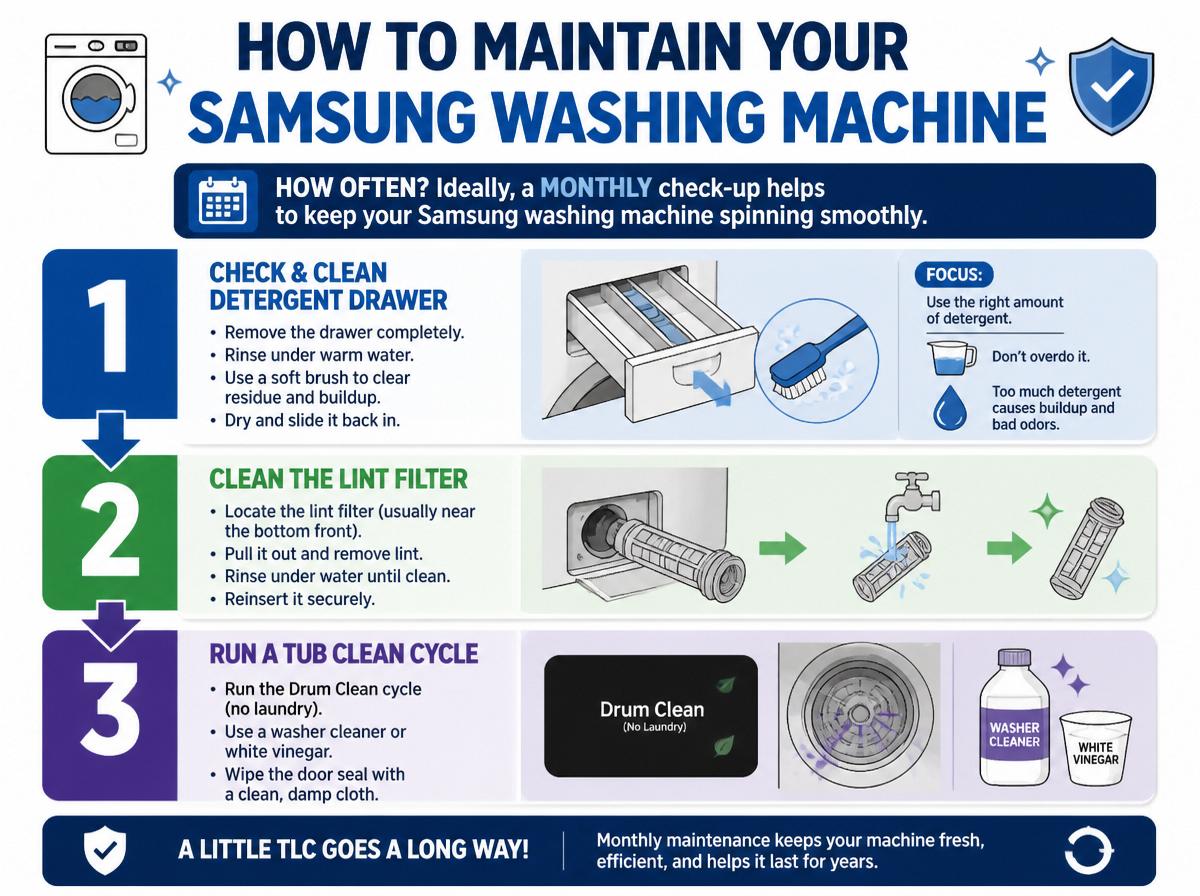
How often should a Samsung washing machine get some TLC to keep spinning smoothly? Ideally, a monthly check-up helps. Focus on detergent dosing and load sizing using the right soap amount and not overstuffing keeps the washer happy. Overload it, and it might grumble or wear out faster!
Here’s a quick guide for easy maintenance:
| Task | Frequency |
|---|---|
| Clean detergent drawer | Monthly |
| Check load size | Each wash |
| Run cleaning cycle | Every 1-2 months |
| Inspect door seal | Monthly |
| Wipe exterior | Weekly |
Cleaning the detergent drawer regularly prevents buildup, while running a cleaning cycle clears out hidden gunk. Always balancing load size avoids wear and tear, and inspecting seals guards against leaks. With simple habits like these, a Samsung washing machine stays efficient and cheerful. It might not sing, but it’ll certainly keep your clothes fresh and clean!
Easy Oven Care for Optimal Performance
Although ovens are built tough, a little everyday care can make a big difference in keeping them cooking like new. Simple habits, such as wiping spills promptly, prevent baked-on messes that can dull oven performance. Regular rack maintenance is key; removing racks for a gentle scrub keeps them free from grime and promotes smooth sliding during use. This small effort can save a lot of frustration later.
Another important step is temperature calibration. If your oven cooks unevenly or dishes seem off, calibrating the temperature helps restore accuracy. Many Samsung ovens offer easy-to-follow guides or built-in tools for this. Remember, a well-calibrated oven bakes evenly, so your meals turn out just right every time.
Checking and Replacing Appliance Filters
Appliance filters come in different types, each doing its own important job to keep things running smoothly. Knowing when and how to check these filters can save a lot of hassle—and maybe even a little money. With easy, step-by-step guidance, anyone can replace a filter without breaking a sweat or calling for backup.
Filter Types Overview
A clean filter is like a superhero cape for many Samsung appliances—it helps them perform their best and keeps things running smoothly. Filters come in different types, each designed with unique media composition to meet specific filtration standards. Knowing these types helps you pick the right one, ensuring your appliance stays happy and healthy.
| Filter Type | Media Composition | Filtration Standard |
|---|---|---|
| HEPA | Fine fiberglass or synthetic | Removes 99.97% of particles 0.3 microns |
| Carbon | Activated charcoal | Eliminates odors and gases |
| Foam | Porous polyurethane foam | Traps large dust particles |
| Mesh | Metal or plastic screens | Captures hair and lint |
Understanding these differences is key to effective filter care.
Step-by-Step Replacement
Keeping filters fresh and clean is like giving your Samsung appliance a little spa day—necessary, invigorating, and surprisingly satisfying. First, unplug the appliance to keep the Control Board and LED Module safe from electrical mishaps. Locate the filter; most are easy to find behind a front panel or in the water line. Gently remove the old filter, noting how it fits. Replace it with a new one, ensuring a snug fit to prevent leaks or sensor errors involving the LED Module’s alerts. Secure the panel back in place. Finally, plug the appliance in and reset any filter indicators, often through a button press or menu setting. Regular filter changes keep your Samsung running smoothly, avoiding costly repairs and brightening up its “mood,just like a little UI glow-up!
Troubleshooting Common Samsung Appliance Issues
Though gadgets can sometimes act up at the worst moments, troubleshooting common Samsung appliance issues doesn’t have to feel like a mystery. Many problems display error codes, which act like secret messages indicating what’s wrong. Decoding these can save time and stress. Plus, if the appliance links with a smartphone app, checking app connectivity often reveals if the device is offline or needs an update. Here’s a quick guide to troubleshoot:
- Check Error Codes: Write down the code and consult the user manual or Samsung’s website; it often suggests easy fixes.
- Verify App Connectivity: Make sure the Wi-Fi is strong, and the appliance shows as connected in the app.
- Reset the Appliance: Sometimes, a quick reset—turning it off and on—clears minor glitches.
Best Practices for Appliance Door Seals
Keeping appliance door seals clean is like giving your fridge or washer a little spa day—it helps them close tight and work better. Gently wiping the seals with a mild cleaner prevents grime buildup, while watching out for cracks or tears can stop leaks before they start. Treating these seals with care isn’t just smart; it’s a simple way to keep appliances happy and running smoothly for years.
Cleaning Techniques
Because appliance door seals face constant wear and exposure to moisture, they require gentle yet thorough care to stay effective. Proper cleaning helps prevent mold and keeps seals flexible. Here are three easy steps to refresh those seals:
- Use Microfiber Methods: Wipe seals gently with a soft microfiber cloth to avoid scratches or damage. These cloths grab dirt without harsh scrubbing.
- Choose Eco Friendly Cleaners: Spray mild, eco-friendly solutions—like diluted vinegar or baking soda mixes—on the seals to clean without chemicals that could break down rubber.
- Dry Thoroughly: After cleaning, dry seals completely using a dry microfiber cloth. Moisture can cause mildew, so this simple step keeps seals happy!
Following these tips helps eyes look beyond dirt’s sneaky spots. A little care saves a lot of trouble later!
Seal Damage Prevention
While door seals might look simple, they play a big role in keeping appliances working smoothly and efficiently. To prevent damage, it’s important to choose cleaning products that match the seal’s material compatibility—harsh chemicals can weaken the rubber or plastic. Another sneaky enemy is UV degradation; sunlight and strong indoor lighting can cause seals to dry out and crack over time. Keeping seals clean, dry, and away from direct light helps them stay soft and effective. If a seal looks cracked or brittle, it’s like a superhero losing their cape—time to replace it! Taking these small steps protects the seal’s strength, saves energy, and keeps the appliance running like new. Remember, a little care goes a long way!
Preventive Measures to Avoid Appliance Damage
Although appliances are designed to handle daily use, they need a little extra care to stay in top shape and avoid unexpected breakdowns. Taking simple preventive measures not only saves money but also minimizes frustration. Here are three key tips:
- Use surge protectors to shield appliances from sudden power spikes. These sneaky jolts can damage electronics, leading to costly repairs or replacements.
- Practice pest prevention by sealing cracks and keeping appliances clean. Crawling critters love to nest in warm, dark spots, causing wiring damage or blockages.
- Avoid overloading appliances beyond their recommended limits. Like people, they perform better when not pushed too hard!
Extending the Lifespan of Your Samsung Appliances
Taking steps to prevent damage is just the beginning when it comes to keeping Samsung appliances running smoothly for years. Proper ventilation is key; sudden overheating can sneakily shorten their lifespan. Make sure vents aren’t blocked by walls, furniture, or dust—your appliances need room to breathe, just like you after a jog! Regularly checking vents and cleaning filters helps appliances stay cool and efficient. Another smart move is keeping software updates current. Samsung often releases updates that improve performance or fix pesky bugs. Ignoring these can be like wearing shoes with holes—your appliance might limp along, but it won’t last as long. Staying on top of updates also helps the appliance adapt to new features and security improvements, ensuring it operates at its best. By combining proper ventilation with timely software updates, Samsung appliances are more likely to deliver reliable service for many years, saving money and hassle down the road.
Energy-Saving Tips for Samsung Devices
Saving energy with Samsung devices is easier than it sounds, and it starts with simple actions like adjusting power settings to suit daily routines. Unplugging appliances when they aren’t in use helps prevent sneaky power drains that can sneak up on your electric bill. These small changes add up, making a big difference for both the planet and your wallet—plus, who doesn’t like saving money while being eco-friendly?
Optimize Device Power Settings
How can a few simple tweaks to Samsung device settings make a big difference in energy use? By adjusting power profiles and using standby scheduling, owners can save energy effortlessly. Here are three easy steps to optimize device power settings:
- Select the right power profile: Choose from options like Eco Mode or Balanced to match your daily needs—this reduces unnecessary energy use without sacrificing performance.
- Enable standby scheduling: Set your appliance to power down during inactive hours, such as overnight. This smart scheduling cuts wasted electricity and extends device life.
- Adjust brightness and sound settings: Lowering screen brightness and volume can trim power draw noticeably, especially on smart appliances.
Small changes add up! With these tweaks, Samsung users protect the environment and their wallets, all while keeping appliances running smoothly.
Unplug Unused Appliances
Once power settings are optimized, another simple way to cut energy use is by unplugging appliances that aren’t in use. This small habit not only saves electricity but also adds travel safety, reducing the risk of electrical fires while away. Parents will appreciate its childproofing benefits, keeping little hands away from cords and switches. Unplugging devices is quick, easy, and a smart way to protect your home and wallet.
| Benefit | Explanation |
|---|---|
| Energy Savings | Stops phantom power drain |
| Travel Safety | Lowers fire hazards when away |
| Childproofing | Prevents children from accidents |
| Appliance Longevity | Reduces wear by avoiding standby |
With just unplugging, Samsung appliance care gets simpler, safer, and smarter—give it a try!
When to Call for Professional Samsung Appliance Repairs
Although many minor appliance issues can be handled at home, there are times when calling a professional for Samsung appliance repairs is the smartest choice. Some problems require special tools or knowledge—tackling them alone can lead to electrical hazards or damage. Plus, trying to fix certain issues might void Samsung’s warranty coverage, making things worse. Knowing when to reach out saves time and stress.
Here are three signs it’s time to call a pro:
- Unusual noises or smells: These often hint at serious internal problems or electric risks.
- Persistent malfunctions: When your appliance keeps failing despite your fixes, it’s beyond simple care.
- Visible damage or leaks: Cracks, broken parts, or water where it shouldn’t be need expert attention immediately.
Frequently Asked Questions
How Do I Update the Software on My Samsung Appliance?
To update the software on a Samsung appliance, one must perform a firmware update through the appliance’s settings menu or Samsung’s SmartThings app. This process guarantees the latest security patch is installed, enhancing device protection and functionality.
Can I Use Third-Party Accessories With Samsung Appliances?
Third-party accessories can enhance functionality, expand options, or reduce costs; however, consulting a compatibility checklist and reviewing safety considerations is essential to prevent damage, guarantee warranty validity, and maintain appliance performance integrity.
What Warranty Options Are Available for Samsung Appliances?
Samsung appliances typically include standard warranty coverage, protecting against manufacturer defects. Customers can also purchase extended protection plans for added security beyond the initial period, covering repairs and replacements to enhance long-term appliance reliability and peace of mind.
How Do I Recycle or Dispose of Old Samsung Appliances?
Discarding old Samsung appliances isn’t just tossing trash—it’s a monumental task! Proper disposal involves removing hazardous components and exploring donation options to avoid environmental harm, ensuring responsible recycling through certified facilities or local programs.
Are There Any Smartphone Apps for Smart Samsung Appliance Control?
Samsung offers the SmartThings app for smart appliance control, enabling users to remotely manage devices, monitor energy consumption, and receive alerts. This integration enhances convenience and efficiency in household appliance management through real-time updates and automation.
Conclusion
Caring for Samsung appliances isn’t just smart—it’s rewarding. Did you know regular maintenance can extend an appliance’s lifespan by up to 30%? That means more meals cooked, laundry done, and fresh food stored without surprise breakdowns. Simple steps, like cleaning filters or checking seals, keep machines happy. So, roll up your sleeves—it’s easier than you think! A little care goes a long way, saving money and sparking pride in a well-kept home.
Explore This Topic
- Back to Maintenance & Repair Procedures
- Back to appliance maintenance
Related guides in this cluster: