
7 Simple Steps to Change Your GE MWF Water Filter
Changing a GE MWF water filter might seem intimidating, but it’s really a simple task anyone can do. With just a few supplies and a little guidance, the process can be smooth. First, gather a clean bowl and cloth. Then, locate the filter compartment in the fridge. It’s like a little treasure hunt! Ready to learn how to remove the old filter and install the new one? Let’s get started on this quick journey together!
Key Takeaways
- Gather necessary supplies including the new GE MWF water filter, tools for spills, and an instruction manual for guidance.
- Locate the filter compartment in your refrigerator, often found in the upper right corner or bottom front.
- Remove the old water filter by twisting it counterclockwise and expect some water drips; have a towel handy.
- Prepare the new filter by soaking it in cold water for 15 minutes and rinsing it to eliminate carbon fines.
- Install the new filter by aligning it correctly, pushing it into place until secure, and checking for leaks.
Gather Necessary Supplies
Before diving into the exciting task of changing a GE MWF water filter, it’s important for everyone to gather the necessary supplies first. This step is crucial to guarantee a smooth process! Start by identifying the correct water filter types for your refrigerator. Check the model number to avoid mistakes. You’ll also need some simple tools, like a bowl to catch any spills and a clean cloth to tidy up afterward. Remember to have gloves on hand for hygiene. It’s a good idea to keep an instruction manual nearby for reference. Additionally, following these maintenance tips can help prolong the life of your new filter, so don’t forget to jot them down. With the right supplies gathered, the task becomes easier and more enjoyable!
Locate Your Water Filter
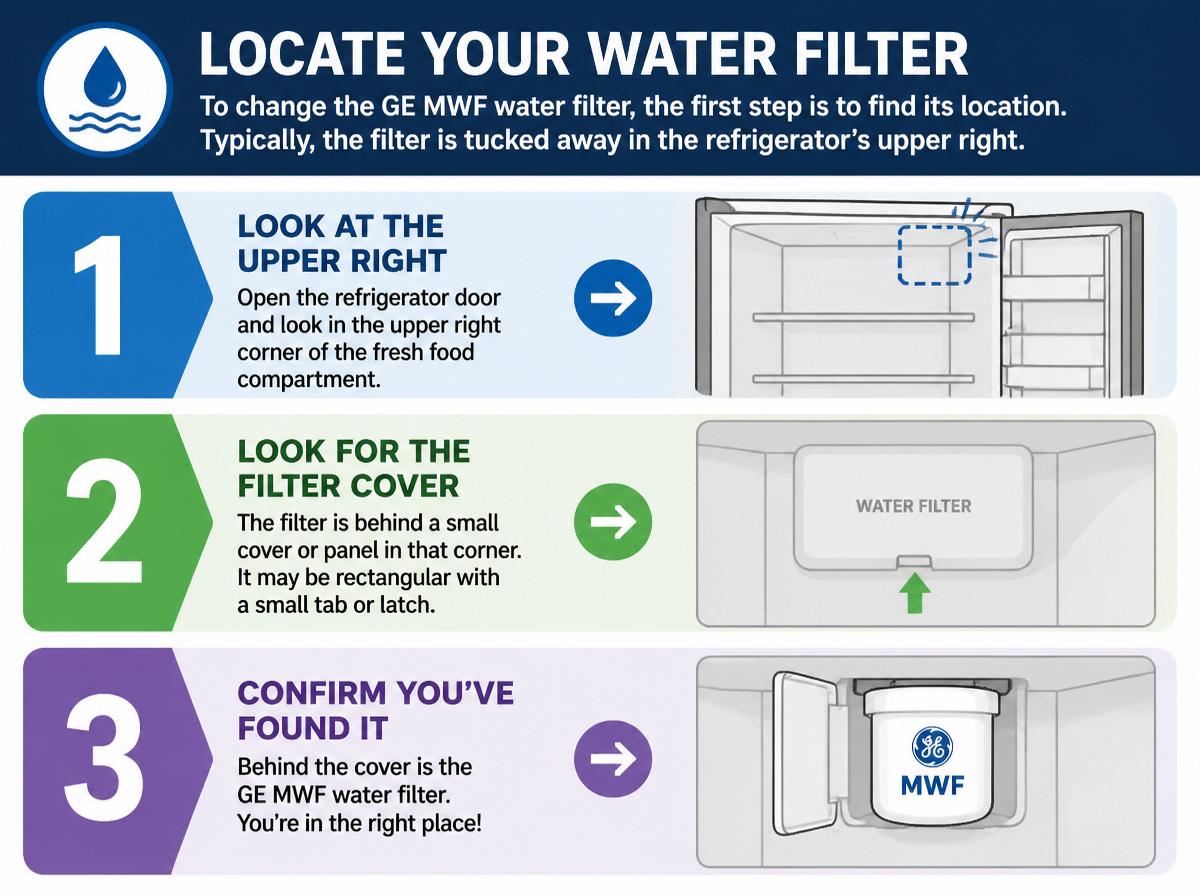
To change the GE MWF water filter, the first step is to find its location. Typically, the filter is tucked away in the refrigerator’s upper right corner or at the bottom front, depending on the model. With a little exploration, accessing the filter compartment becomes a breeze, and soon, anyone can feel like a water filter pro!
Identifying Filter Location
Finding the water filter in a GE refrigerator can feel a bit like a scavenger hunt, but it’s definitely worth the effort! Knowing the filter’s location can help guarantee refrigerator performance and proper filter maintenance. Generally, the filter’s placement depends on the model, so recognizing any signs of model compatibility can guide searching.
Here’s a handy table to help locate the filter:
| Model Type | Common Filter Location | Tips |
|---|---|---|
| Side-by-side | Inside the fridge section | Look at the upper right |
| Top freezer | Inside the ceiling or top | Check above the ice maker |
| Bottom freezer | Inside the refrigerator | Usually in a pull-out drawer |
| Built-in cabinets | In a compartment in the door | Open the door to see it |
With patience, finding the filter is an easy win!
Accessing Filter Compartment
With the filter location in mind, accessing the filter compartment is the next exciting step on the journey to cleaner water! First, locate the compartment design in your refrigerator. Generally, it will be near the bottom front or inside the left door. Gently press the cover or twist it to open, depending on your model. Remember, filter access may be tricky, so take your time and don’t force anything. If it feels stuck, a little wiggling can help! Once opened, you’ll reveal the old filter, ready to be replaced. Celebrate this small victory—it’s one step closer to fresh, crisp water. Following these tips guarantees the job is easier and more enjoyable! Happy filtering!
Remove the Old Water Filter
To begin removing the old water filter, first locate the filter compartment in the refrigerator. A little twist is all it takes to release the filter, making this task quick and easy—like popping the cap off a bottle! With the filter now out, readers can move on to installing the new one, ensuring their water stays fresh and clean.
Locate the Filter Compartment
Where can the hidden filter compartment be found? The GE MWF water filter’s secret spot is intentionally tucked away to keep things neat. Understanding the compartment features can help in your mission. Here’s how to locate it:
- Check inside your refrigerator; look for a small, rectangular door.
- Examine the bottom of the fridge; some designs hide it there.
- Feel around the inside of the fridge door—it might surprise you!
- Consult your user manual for specific details about the filter design.
Once found, you’ll be well on your way to a rejuvenating clean water supply. Remember, every step makes you a DIY champion! Keep going; you’ve got this!
Twist and Remove Filter
Now that the filter compartment has been located like a hidden treasure, it’s time for the exciting part: removing the old water filter! First, gently twist the filter counterclockwise. It might feel snug, but a bit of elbow grease will help. Once it loosens, carefully pull it out, being mindful of any drips. Some filter types have a quick-release feature, making this step easier. If there is a water residue, a towel can save your day! As you remove the old filter, remember these installation tips for the new one: align it properly and give it a few twists until it locks in place. Great job! You’re one step closer to having fresh, clean water at home!
Prepare the New Water Filter
Before diving into the installation, it’s important to get the new GE MWF water filter ready for action. Preparing the filter properly confirms it will provide the clean water you and your family deserve. Here are some simple steps to follow:
- Check the filter type to confirm it matches your device and the recommended specifications.
- Remove any packaging from the new filter, including protective caps or seals.
- Soak the filter in cold water for about 15 minutes; this helps activate it and improve performance.
- Rinse the filter under running water to remove any loose carbon fines.
Following these maintenance tips guarantees that your filter will work efficiently. With a little preparation, anyone can get their GE MWF filter ready for seamless installation!
Install the New Water Filter
Ready to take the next step? Installing the new water filter can be a breeze with a few handy filter installation tips. First, align the filter correctly before pushing it into place. It should snap in with a satisfying click. One common mistake is forcing the filter, which can damage both the filter and the unit. Remember, a gentle touch works best! Make certain to check the filter’s indicator light, if your fridge has one, to confirm it’s installed correctly. Avoid skipping this step; it’s important! A good rule of thumb is to double-check for leaks around the filter after installation. With these tips in mind, readers can feel confident and excited about their fresh water source. Happy filtering!
Flush the System
Flushing the system is an essential step that helps confirm the new water filter functions perfectly. This process improves water quality and ensures any leftover contaminants are cleared out. Here are some simple flushing techniques to follow:
- Turn on the water dispenser Allow it to run for approximately five minutes.
- Check the ice maker If it’s connected, let the ice maker run for one cycle to flush any stagnant water.
- Discard the first batch Throw away the first few glasses of water, as they may have impurities.
- Inspect for clarity Watch for any discoloration in the water, which indicates the system is still flushing.
Reset the Water Filter Indicator
One of the satisfying steps to take after replacing the GE MWF water filter is resetting the water filter indicator light. This light will help remind users when it’s time for the next filter change, and resetting it is simple! There are a few reset methods. Users should check their refrigerator model, as the steps may vary slightly.
Here is a quick table to help:
| Method | Steps | Result |
|---|---|---|
| Button Hold | Press and hold for 3-5 sec | Indicator resets |
| Control Panel | Navigate and select reset | Light turns off |
| Power Cycle | Unplug for 30 seconds | Restores settings |
Making sure the indicator lights reflect the change gives a sense of accomplishment and readiness!
Frequently Asked Questions
How Often Should I Replace My GE MWF Water Filter?
The replacement frequency for a GE MWF water filter is typically every six months. This guarantees peak performance and maintains the water filter’s lifespan, allowing for continuous access to clean and fresh water for consumption.
Can I Use a Third-Party Water Filter Instead?
Third-party filters can be used, but filter compatibility varies. It is crucial to ascertain that the alternative filter meets the required specifications for peak performance and does not compromise the appliance’s integrity or warranty.
What Are the Signs That the Water Filter Needs Replacing?
As the wise owl knows when winter approaches, signs of a weary water filter surface through murky quality and diminished flow. Observing these changes often signals the end of the filter’s lifespan, demanding timely replacement.
Is It Safe to Drink Water Before Flushing the System?
It is advisable to wait before drinking the water. Flushing the system guarantees ideal water quality, removing contaminants and air bubbles. Following the flushing procedure assures safety and enhances the overall freshness of the water.
Do I Need to Turn off the Water Supply During Replacement?
During filter replacement, it is not necessary to turn off the water supply. The installation process is designed to minimize leaks, allowing for efficient changes without interrupting water flow. Caution is advised for unexpected spills.
Conclusion
You’ve successfully transformed your refrigerator into a rejuvenating oasis, bursting with crisp, clean water. By following these seven simple steps, you guaranteed that your family stays hydrated and happy. Like a gardener tending to their blooms, each step nurtures your water filter’s health. Don’t forget to celebrate your accomplishment; you’ve become a DIY hero! So, next time you need to change the filter, you’ll feel as confident as a fish swimming in clear waters. Stay revitalized!
Explore This Topic
- Back to home maintenance
- Back to GE appliances
Related guides in this cluster: