
Reset Methods for Amana Washing Machines
Resetting Amana washing machines is simple and can help fix many problems. For top-load models, unplug the machine for 1-2 minutes, then plug it back in and start a cycle. For front-load models, wait at least 5 minutes before plugging in. If issues persist, try a hard reset by unplugging for 10 minutes. Always check for error codes and clogs in the drainage system. With these steps, your washing machine can be back to normal in no time! Keep going to discover even more helpful tips!
Key Takeaways
- Soft Reset for Top-Load Models: Unplug for 1-2 minutes, reconnect, ensure the lid is closed, and select a regular wash cycle to clear glitches.
- Soft Reset for Front-Load Models: Unplug, wait 5 minutes, then reconnect or press “Start/Pause” twice quickly to reset.
- Hard Reset Procedure: Unplug for 10 minutes, plug back in, and press the power button to restore functionality and clear minor issues.
- Check Error Codes: Refer to the user manual for specific error codes, as they can guide the necessary reset or troubleshooting steps.
- Control Board Reset: Unplug for 5 minutes, reconnect, monitor for blinking lights, and initiate a cycle to reset unresponsive controls.
Understanding Error Codes on Amana Washing Machines
When it comes to Amana washing machines, understanding error codes is like finding the clue in a treasure hunt—exciting and essential! These codes serve as the machine’s way of communicating problems. Each error code has specific meanings, pointing out issues that may arise during a wash cycle. For instance, a code like “F20might indicate a water inlet problem, whereas “F21could signal a draining issue.
When encountering an error, using some error troubleshooting tips can save the day. First, don’t panic! Look up the error code in the user manual or online resources for clear explanations. Next, check the machine’s connections or filters, as simple tasks often resolve these hiccups. Always remember, knowledge is power! By mastering error code meanings, anyone can become a laundry hero, ready to tackle any challenges their Amana washing machine throws their way.
Soft Reset Method for Top-Load Models
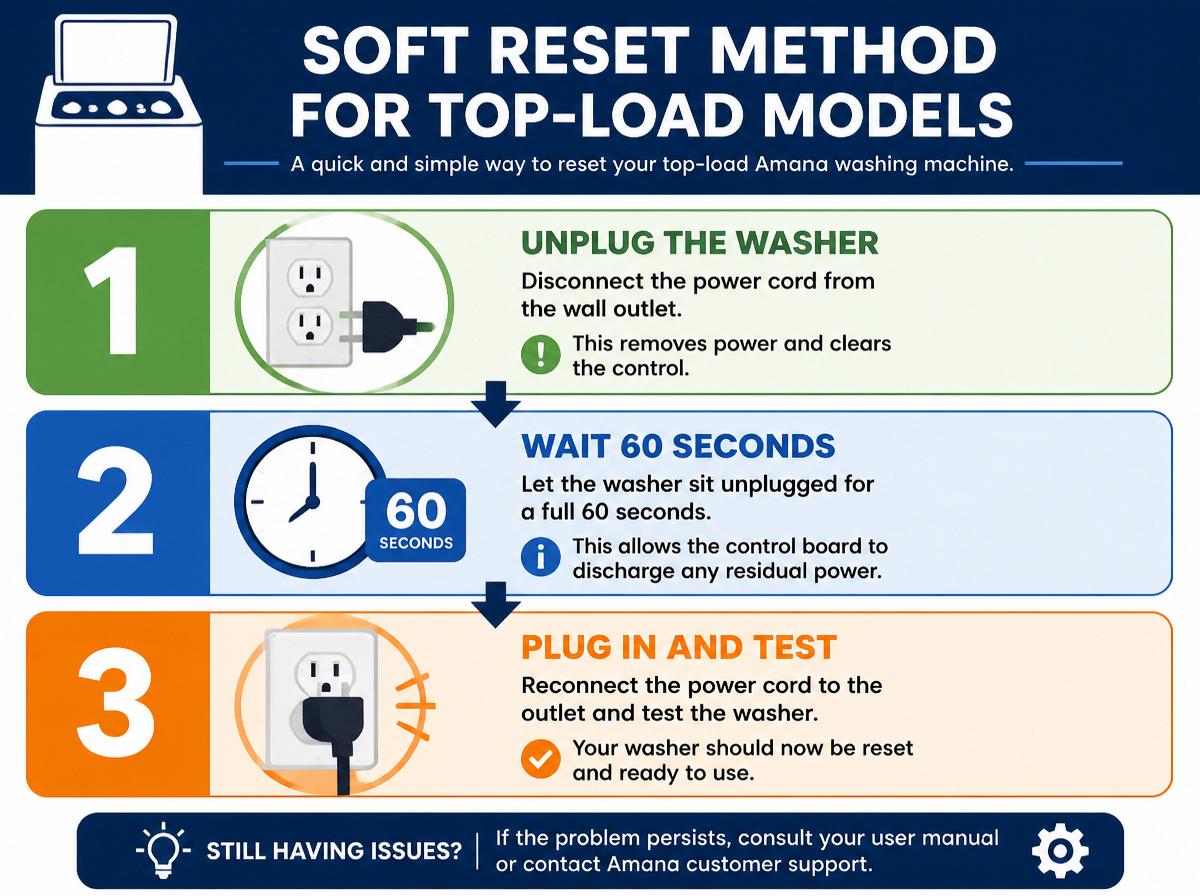
Have you ever felt puzzled by a washing machine that just won’t cooperate? Don’t worry; many encounter this issue with top-load Amana models. A soft reset can be a simple solution to get things back on track. First, unplug the machine from the wall for about 1-2 minutes. This brief break allows the machine to clear minor glitches. Next, plug it back in and select a regular wash cycle. But wait! Before you hit start, verify the lid is closed tightly.
If things don’t change, repeat this soft reset procedure. It’s important to remember that this reset method can be done as needed, but don’t overdo it. Knowing when to use it can save you time and frustration. Everyone deserves a machine that works well, so use these troubleshooting tips to keep your Amana top-load washer singing a happy tune!
Soft Reset Method for Front-Load Models
When it comes to Amana front-load washing machines, a soft reset can be a simple way to troubleshoot and restore its settings. Following model-specific instructions can help users get back to washing without a hitch. With just a few easy steps, anyone can feel like a pro, saving the day and their laundry!
Soft Reset Procedure
Sometimes, appliances like Amana washing machines need a little nudge to get back on track, and that’s where the soft reset comes in handy! This simple procedure helps resolve minor issues while offering soft reset benefits like restoring normal functions. Here’s a straightforward guide to follow:
- Unplug the washing machine.
- Wait for at least 5 minutes.
- Plug the machine back in.
- Select a cycle and start it.
This soft reset procedure incorporates effective troubleshooting techniques, ensuring the machine runs smoothly again. It’s a small step, yet it can make a big difference! Just remember, if problems persist, calling for professional help might be the best bet. Feeling confident in tackling your washing machine issues can lead to many successful laundry days ahead!
Model-Specific Instructions
Newer Amana front-load washing machines come with their own unique soft reset method that can help clear up any small hiccups in performance. First, users should verify the washer is powered on. Then, within a few seconds, press the “Start/Pause” button twice quickly. This simple action prompts a reset, which can fix minor issues without turning the machine off completely. Model comparisons show that different models may have slight variations in these steps, making it important to consult specific troubleshooting tips. If the problem persists, a deeper reset might be needed. Remember, a little patience goes a long way, and often, these small fixes can bring a big smile back to laundry day!
Hard Reset Procedure for Amana Washing Machines
Resetting an Amana washing machine can feel like a challenging task, but it’s actually quite simple! When the machine’s acting up, a hard reset might be just what it needs. This process helps clear minor issues and can restore normal functionality. Here’s how to do a hard reset through a power cycle:
- Unplug the washer from the wall outlet, ensuring safety first.
- Wait for 10 minutes to allow the machine to completely power down.
- Plug the washer back in, making sure the connection is secure.
- Press the power button to restart the machine.
Performing a Factory Reset
When the washing machine acts up and simple resets don’t do the trick, performing a factory reset can seem like a magical solution. This action restores the machine to its original factory settings and can resolve persistent issues. However, it’s crucial to follow the correct troubleshooting techniques.
Here’s a helpful table to guide the reader:
| Step | Description |
|---|---|
| Unplug the machine | Disconnect the power for at least 5 minutes. |
| Press power button | After re-plugging, press the power button to turn it on. |
| Select cycle | Choose your preferred washing cycle. |
| Wait for reset | Allow the machine to complete its reset process. |
Completing a factory reset can naturally feel overwhelming. Remember, this process is designed to help you, and with a bit of patience, your Amana washing machine will be back in action!
Resetting the Control Board
When it comes to managing an Amana washing machine, resetting the control board can be a helpful step if problems arise. Identifying any issues with the control board is the first part of the puzzle, and then following a simple reset process can bring the machine back to life. It’s important to know that common resetting errors can happen, but don’t worry—just take a deep breath and follow along for the solutions!
Identifying Control Board Issues
Troubleshooting a washing machine can feel a bit like solving a mystery, especially when the control board starts acting up. Identifying control board symptoms can be essential in figuring out the issue. Here are some common signs to watch for:
- Unresponsive buttons or a non-functional display.
- Erratic cycle changes or the machine stops mid-cycle.
- Inconsistent power supply leading to unusual noises.
- Error codes flashing that don’t seem to match any known problems.
Using these troubleshooting techniques can help narrow down the problem. If you notice any of these symptoms, it may be time to explore deeper into the control board’s health. Often, with a little persistence and careful observation, solutions are within reach!
Step-by-Step Reset Process
Resetting the control board of an Amana washing machine can often feel like giving the machine a fresh start, much like how a good night’s sleep can change a person’s day! To begin, unplug the machine from the power source. Wait for about five minutes—this allows the systems to shut down completely. Next, plug the machine back in, keeping an eye on any blinking lights, which can help with reset troubleshooting. Then, turn the washer on, selecting a cycle and pressing the start button. Finally, monitor the machine for a brief period to assess the reset frequency needed. This simple process not only helps in restoring function but also adds a little magic to household chores!
Common Resetting Errors
Even the most experienced DIY enthusiasts can encounter hiccups while trying to reset the control board of an Amana washing machine. This resetting experience often comes with common misconceptions that can lead to frustration. To help, here are some frequent errors to watch for:
- Not unplugging the machine: Failing to unplug can prevent the reset from occurring.
- Ignoring error codes: Skipping over error codes might lead to overlooking essential issues.
- Reset timing: Resetting too quickly can disrupt the process; timing is key.
- Wrong button combination: Pressing the incorrect buttons can confuse the control board.
Clearing the Drainage System Errors
When an Amana washing machine flashes a drainage system error, it can feel like the laundry fairy has taken a vacation! No need to panic; this can often be resolved with some simple drainage troubleshooting. First, check the drain hose for kinks or clogs—sometimes, it just needs a little gentle nudging. A blocked filter can also cause issues, so keeping it clean is essential.
Pump maintenance is another key step. If the pump isn’t working correctly, it may need to be cleared of debris or inspected for damage. To ease your mind, unplug the machine and let it sit for a few minutes before plugging it back in. This little reset can sometimes work wonders! By staying calm and taking these steps, anyone can tackle these errors. Remember, every machine has its quirks, but with a bit of effort, the laundry fairy can be summoned back to work!
Tips for Maintaining Your Amana Washing Machine
Maintaining an Amana washing machine is like giving it a little TLC, which can help it work better and last longer. Just like brushing your teeth keeps them healthy, routine cleaning keeps your washer in tip-top shape. Here are some easy laundry tips to follow:
- Clean the Lint Trap: Remove lint after each load to improve performance.
- Wipe the Drum: Gently clean the drum with a damp cloth to prevent stains and odors.
- Run a Cleaning Cycle: Use a washing machine cleaner monthly to eliminate dirt and grime.
- Check Hoses Regularly: Inspect hoses for leaks or wear to avoid water damage.
When to Call a Professional Technician
At times, even the most devoted DIY enthusiast may find themselves stumped by their Amana washing machine. Recognizing the signs of a breakdown is vital. Strange noises, leaks, or a machine that won’t start can indicate deeper issues. If these problems persist despite resets or simple fixes, it might be time to call in a professional technician.
A technician’s qualifications are essential. Look for someone who is certified and has experience with Amana products. They have the knowledge to diagnose problems that aren’t easily recognizable. Don’t be afraid to ask questions or seek their advice; they’re there to help!
Frequently Asked Questions
How Can I Prevent Future Errors in My Amana Washing Machine?
To prevent future errors in an Amana washing machine, one should perform routine maintenance and employ troubleshooting techniques. Regular inspections, cleaning, and prompt attention to minor issues can greatly enhance the machine’s longevity and performance.
Is There a Warranty for Repair Services on My Washing Machine?
Surprisingly, warranty coverage for repair options might not be what one hopes for. Oftentimes, repair services depend on the machine’s age and prior ownership, leaving users to navigate potential costs for unforeseen issues.
What Should I Do if the Reset Doesn’t Work?
If the reset doesn’t work, they should follow troubleshooting tips such as checking power connections, reviewing error codes, and consulting the user manual. If issues persist, seeking professional appliance service may be necessary for effective resolution.
Can I Reset My Washing Machine Without Unplugging It?
Surprisingly, a washing machine can often undergo a software reset directly via its control panel, sparing users the dramatic task of unplugging. Yet, results may vary, leaving some machines impervious to this convenient method.
Where Can I Find Replacement Parts for Amana Washing Machines?
Replacement parts for Amana washing machines can be found through authorized replacement part suppliers or online retailers. Exploring Amana repair options may also lead to additional resources for locating specific components needed for repairs.
Conclusion
In the world of laundry, an Amana washing machine can be like a trusty friend, helping us keep our clothes clean and fresh. When it acts up, using reset methods can be like giving that friend a gentle nudge to get back on track. Remember, with a little patience and care, you can solve most problems! If things still seem tangled, don’t hesitate to reach out for help. Every machine deserves a little love to keep spinning happily!
Explore This Topic
- Back to appliance troubleshooting
- Back to Amana washing machines
Related guides in this cluster: