
Mastering Kenmore Elite Washing Machine Reset Methods
Mastering the reset methods for a Kenmore Elite washing machine is simple and can solve many common problems. Start with a soft reset by unplugging the machine for one minute. For stubborn issues, try a hard reset by unplugging it for five minutes. If the machine still doesn’t respond, you can reset the control board by holding the “Start” and “Pause” buttons together for ten seconds. These steps can help restore your machine to working order, and there’s even more helpful tips to explore!
Key Takeaways
- Perform a soft reset by unplugging the machine for 1 minute to clear minor glitches and restore normal operation.
- For stubborn issues, execute a hard reset by unplugging for 5 minutes before plugging it back in to refresh system functionality.
- Reset the control board by holding the “Start” and “Pause” buttons for 10 seconds after unplugging for 5 minutes.
- Check for specific error codes like “F01” or “F21” to diagnose issues before attempting resets.
- Seek professional help for persistent problems, unresponsive buttons, or water leaks that reset methods do not resolve.
Understanding Common Error Codes
Often, when using a Kenmore Elite washing machine, people encounter pesky error codes that pop up just when they’re ready to do laundry. These codes can seem scary, but they’re really just the machine’s way of telling users something is off. Understanding error code meanings is the first step toward solving the mystery. For example, an “F01 may indicate a control board issue, while “F21 often points to drainage problems.
No need to panic! There are simple troubleshooting tips to assist. First, check the machine’s doors to verify they’re closed tightly. Next, inspect any hoses for clogs or kinks. If needed, consult the user manual—it’s like having a helpful friend nearby! Remember, a little patience goes a long way. With these tools, users can tackle those error codes head-on, turning laundry day back into a breeze instead of a battle!
Soft Reset Procedure
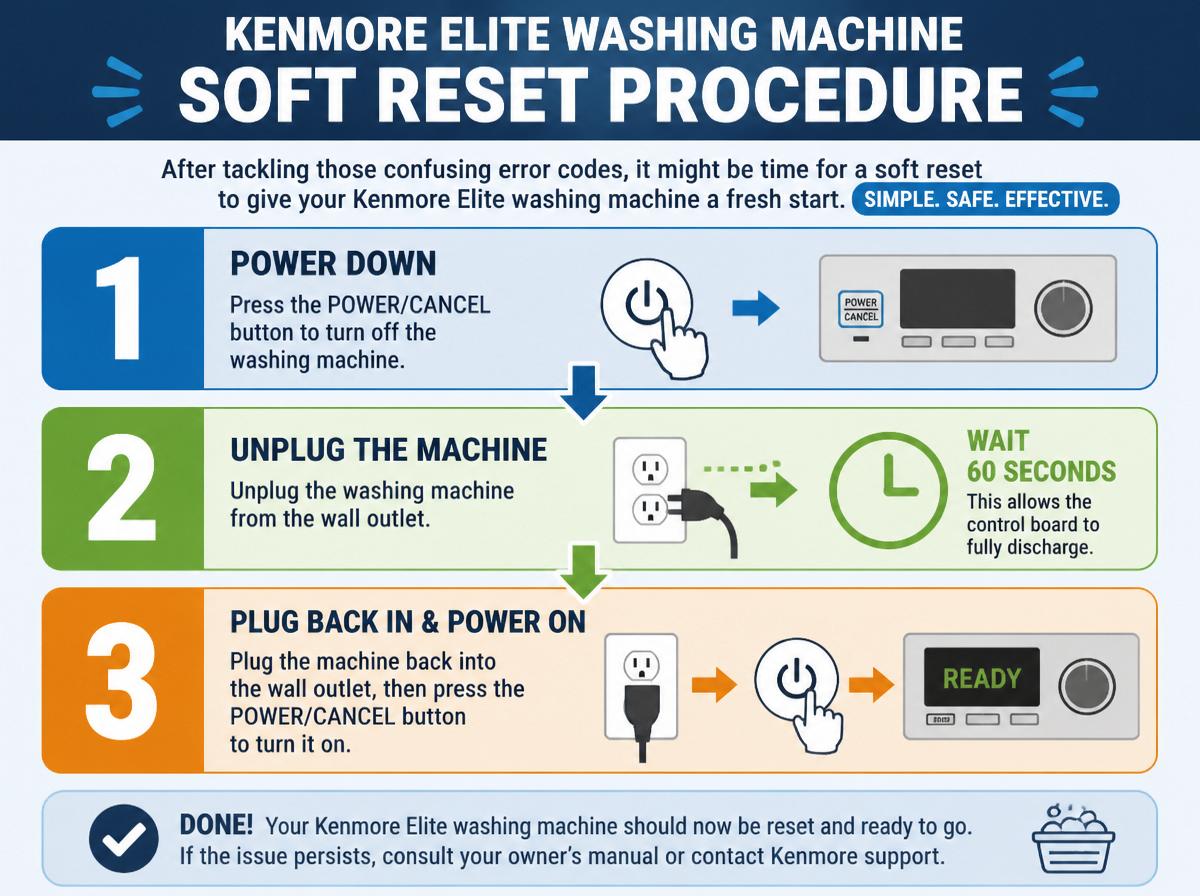
After tackling those confusing error codes, it might be time for a soft reset to give the Kenmore Elite washing machine a fresh start. This simple procedure can often solve minor glitches. One of the key soft reset advantages is that it helps clear temporary issues without any disruption to your settings. To perform a soft reset, simply unplug the machine for about a minute, then plug it back in. This little break allows the electronics to reset and can improve performance.
As for soft reset frequency, it’s recommended to do this when strange noises or erratic cycle behavior occur. Regularly practicing soft resets can enhance the longevity of the washing machine. It’s like giving your washer a little moment to breathe! So, don’t hesitate to try this easy step—it could save you from more significant headaches down the road. Remember, every machine needs a refresher sometimes!
Hard Reset Procedure
Have you ever faced stubborn issues with your Kenmore Elite washing machine that just won’t go away? Performing a hard reset can sometimes be the solution you need. This troubleshooting technique can help clear any glitches and restore your machine’s functionality. Let’s look at some reset benefits and steps involved in this simple process.
| Step | Action |
|---|---|
| Step 1 | Unplug the machine. |
| Step 2 | Wait for 5 minutes. |
| Step 3 | Plug it back in. |
| Step 4 | Turn on the machine. |
| Step 5 | Select a cycle to test. |
Resetting the Control Board
When it comes to a Kenmore Elite washing machine, the control board can sometimes act a little cranky, just like a toddler who really wants a cookie. Identifying issues with the control board is the first step to getting everything back in working order, and the reset process is simpler than it sounds! If things still aren’t right after following the steps, don’t hesitate to seek help—every superhero needs a sidekick sometimes!
Identifying Control Board Issues
Identifying control board issues in a Kenmore Elite washing machine can seem tricky, but it’s not an insurmountable challenge! Shining a light on control board symptoms can help users troubleshoot effectively. Some common signs include the machine not responding, unusual noises, or lights flashing erratically. Recognizing these symptoms is the first step toward a solution.
| Control Board Symptoms | Troubleshooting Tips |
|---|---|
| Machine won’t start | Check power supply connections |
| Flashing lights | Reset the control board |
| Unusual sounds | Inspect wiring for damage |
Step-by-Step Reset Process
Resetting the control board of a Kenmore Elite washing machine can be a simple yet effective solution to many problems. This step can bring back the machine’s functionality and provides several reset benefits. Here are some straightforward troubleshooting tips:
- Unplug the washing machine from the power source for 5 minutes.
- Press and hold the “Start” and “Pause” buttons simultaneously for about 10 seconds.
- Plug the machine back in and set it to a regular wash cycle to test its performance.
When to Seek Help
While many simple problems can be fixed with a quick reset, sometimes a Kenmore Elite washing machine may need a little extra help. If your machine encounters emergency situations, it’s best to seek professional assistance. Ignoring persistent issues can lead to larger problems and even void warranty coverage.
Here’s a quick guide on when to call for help:
| Signs of Trouble | Possible Issues | Action to Take |
|---|---|---|
| Constant error codes | Control board failure | Seek professional help |
| Unresponsive buttons | Internal malfunction | Contact customer service |
| Leaking water | Hose or seal issue | Schedule a repair |
Taking these steps guarantees your washing machine will get the attention it requires, keeping laundry day stress-free!
Power Cycle Method
Have you ever wondered how a simple power cycle could solve your Kenmore Elite washing machine troubles? Power cycling is a quick and effective way to reset the machine, often boosting its energy efficiency. Here’s how to power cycle your washer:
- Unplug the machine: First, disconnect it from the power source. This may feel like a break for your washer!
- Wait for 5 minutes: Give it a moment—think of it as a little rest. Don’t worry, it’ll be back soon!
- Plug it back in: Reconnect the power, and turn on the machine. You might be amazed at how it responds!
This simple method can clear error codes, fix minor issues, and enhance your washer’s functioning. So, next time you face a glitch, remember that a power cycle might just do the trick, making your laundry day a whole lot brighter!
Using Diagnostic Mode
Revealing the secrets of your Kenmore Elite washing machine can feel like a treasure hunt, and using the diagnostic mode is one of the best tools in your toolbox. This mode grants access to various diagnostic features, allowing for easy troubleshooting techniques. To access it, simply follow the user manual’s specific steps, usually involving the control panel sequence.
Here’s a quick reference table for common diagnostic symbols:
| Symbol | Meaning |
|---|---|
| F02 | Drain issue detected |
| F21 | Long drain time |
| F11 | Motor control problem |
When to Call a Professional
When should someone consider calling a professional for their Kenmore Elite washing machine? There are specific situations that can indicate it’s time to seek help. Here are three common repair scenarios:
- Strange Noises – If the washing machine starts making loud or unusual sounds, it may signal a serious issue.
- Error Codes – Persistent error codes that do not resolve after a reset can indicate deeper problems.
- Water Leaks – If water is pooling around the machine, this might mean a plumbing issue or a seal that needs replacing.
Seeking professional service benefits homeowners by ensuring that the problems are diagnosed correctly, preventing future headaches. Professionals have knowledge, tools, and experience that most people don’t, saving both time and potential costs. When in doubt, don’t hesitate to reach out for help; after all, no one has superpowers when it comes to repair work!
Frequently Asked Questions
Can I Reset the Kenmore Elite Washing Machine Without a Manual?
Yes, the Kenmore Elite washing machine can be reset without a manual. Various reset techniques exist that aid in malfunction troubleshooting, enabling users to address issues independently using online resources or general appliance knowledge.
Will Resetting Affect My Saved Wash Settings?
Resetting the washer typically results in the loss of saved settings, impacting the user experience. For instance, Jane’s custom delicate cycle was erased after her reset, leading to frustration during her laundry routine.
Is There a Specific Sequence for the Reset Buttons?
To initiate a reset, a specific reset sequence must be followed, typically involving a precise button combination. This guarantees the washing machine reverts to default settings, allowing it to operate correctly after encountering issues.
How Often Should I Reset My Washing Machine?
Resetting a washing machine should occur only when necessary, typically during troubleshooting or after resolving issues. Following best washing practices can minimize the need for resets, ensuring smoother operation and prolonging the life of the appliance.
What if the Reset Doesn’T Resolve the Issue?
When the reset fails, it’s akin to a bird with clipped wings. Only further troubleshooting steps or professional repair can lift the appliance back into functionality, ensuring it resumes its cycles smoothly through diligent care.
Conclusion
To sum up, knowing how to reset your Kenmore Elite washing machine can really save the day when issues arise. Who wouldn’t want to tackle laundry mishaps with confidence? By following the provided methods, from soft resets to powering down your machine, you can keep your appliance running smoothly. Remember, if things get too tricky, it’s perfectly okay to reach out for help. After all, even the best of us need a hand sometimes! Happy washing!
Explore This Topic
- Back to Kenmore washing machine
- Back to appliance repair
Related guides in this cluster: