
What Do the Different GE Oven Reset Methods Do?
Different reset methods for GE ovens help fix problems and improve performance. Power cycling clears glitches, while a factory reset restores original settings. You can also reset the control lock if it’s stuck. If error codes pop up, resetting often helps! The self-cleaning feature can also be reset for best results. Each method has its purpose, making your oven work better. Keep going to discover more helpful tips and tricks for your kitchen adventures!
Key Takeaways
- Regular resets refresh oven settings and improve performance, preventing small issues from becoming major problems.
- Power cycling by unplugging or using the circuit breaker clears glitches and eliminates error messages.
- A factory reset restores original settings, useful for persistent issues and undoing recent changes.
- The self-cleaning feature reset maintains performance by ensuring the oven cools and checking the door lock post-cleaning.
- Understanding error codes helps address specific issues, with resets often resolving many concerns related to these codes.
Understanding the Importance of Resetting Your GE Oven
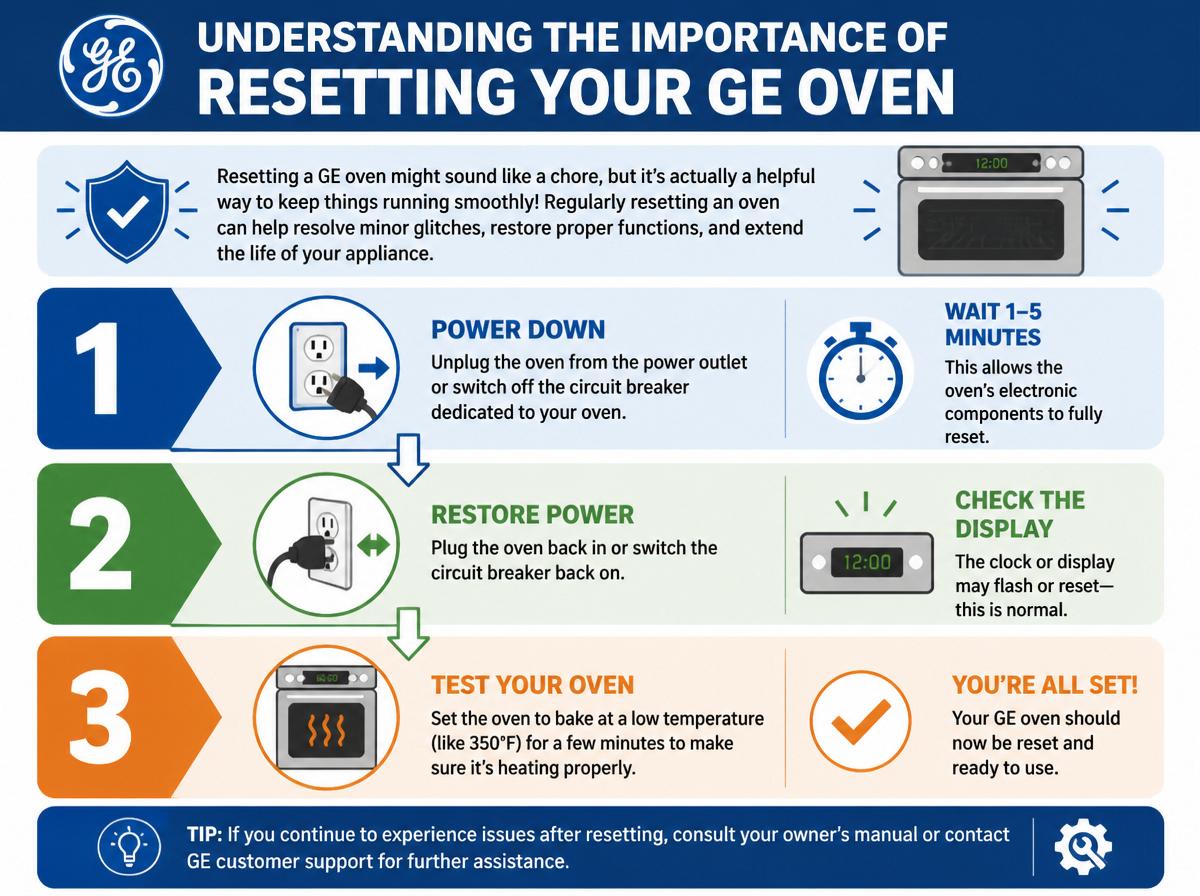
Resetting a GE oven might sound like a chore, but it’s actually a helpful way to keep things running smoothly! Regularly resetting an oven can prevent small problems from turning into big ones, making it an essential part of oven maintenance tips. Sometimes, the oven may act odd or give inaccurate readings, so a reset offers an easy troubleshooting strategy.
Think of resetting your oven as giving it a little nudge when it’s feeling sluggish. This simple step can refresh the settings and make certain everything works just right. Plus, it’s a great way to keep those delicious meals coming out perfectly cooked.
Don’t worry; most resets are straightforward and require no fancy tools! Next time things seem off, just remember that a little reset can do wonders. It’s like a mini spa day for your oven, and who doesn’t love a good treat? So go on, give it a try!
Power Cycling Your GE Oven
Power cycling your GE oven can be a helpful way to reset the control board and check the power supply. This simple process allows users to assess the oven’s functionality, ensuring it’s ready for cooking once again. With just a quick off-on action, many issues can be solved, making it feel like magic when the oven works perfectly again!
Resetting Control Board
Sometimes, all it takes to revive a GE oven is a simple reboot! Resetting the control board can restore normal functions and fix minor issues. The control board functions as the oven’s brain, and sometimes it just needs a little break. Here are three easy steps for effective control board troubleshooting:
- Unplug the Oven: Disconnect it from the power source for about 1-5 minutes.
- Press and Hold: While it’s unplugged, press and hold the “Start” button for 30 seconds to clear any glitches.
- Reconnect the Power: Plug it back in and turn on the oven.
Following these steps can be a quick fix for many problems. Remember, a little patience goes a long way in oven care!
Power Supply Check
After giving the control board a little break, it’s time to check the power supply to the GE oven. First, verify that the oven is plugged into a working power source. Sometimes, a loose connection can cause electrical issues that prevent the oven from operating properly. If the plug looks good, consider checking your circuit breaker. A tripped breaker might stop power from reaching the oven, making it seem like it’s out of order. Flip the breaker off and then back on, and see if that does the trick! Remember, even the best ovens need a little TLC. With a bit of patience and careful checking, most power supply problems can be resolved easily. You’ve got this!
Oven Functionality Assessment
While it might feel a bit intimidating, evaluating the functionality of a GE oven can be as easy as flipping a switch! To conduct an oven performance evaluation, follow these simple steps:
- Power Cycling: Unplug the oven for about 30 seconds, or flip the circuit breaker.
- Check Settings: Confirm the oven is set to the correct mode for your cooking task.
- Temperature Test: Use an oven thermometer to verify that it heats accurately.
These actions not only help in an appliance efficiency review but also guarantee your oven is ready for delicious meals. Remember, every oven has its quirks, and troubleshooting can be part of the fun. Stay positive, and soon you’ll be a kitchen whiz!
Performing a General Reset
When an oven starts acting a little quirky, performing a general reset can often do the trick to bring it back to life. This simple step is a key part of oven maintenance. To do a general reset, just unplug the oven or flip the circuit breaker off for about five minutes. This allows the system to clear any temporary glitches. After restoring power, you might find that your oven functions much smoother.
Many users discover reset benefits, such as improved performance and the elimination of annoying error messages. It’s like giving your oven a fresh start! Regularly performing this reset can extend the lifespan of the appliance, ensuring delicious meals and fewer headaches in the kitchen. So, when things get a bit wonky, try this easy fix. Your oven will thank you, and you’ll be back to baking in no time. Happy cooking!
Resetting the Control Lock Feature
Releasing the control lock feature on a GE oven can feel like cracking a secret code, but it’s easier than it sounds! This safety feature is designed to prevent accidental changes while cooking. If you’re ready to open up your oven, follow these simple steps:
- Locate the control lock key It’s often marked with a padlock symbol on the panel.
- Hold down the control lock key Press and hold for about 3 seconds, or until you hear a beep.
- Check for the unlocking indicator A light may show that the control lock is disabled.
Once you’ve completed these steps, your oven is ready for action again! Remember, the control lock safety features are there to keep everyone safe while cooking. If you ever feel stuck, don’t worry—you’ve got this! Just take it one step at a time, and soon you’ll be a pro at managing your GE oven.
Troubleshooting Oven Error Codes
When the GE oven shows an error code, it can be confusing and a little worrisome. Understanding these common error codes is the first step to getting back to cooking your favorite meals. With some simple reset methods and solutions, anyone can overcome these hiccups and restore their oven to working order, so let’s explore how to tackle these issues together!
Common Error Codes
Troubleshooting a GE oven can sometimes feel like traversing a maze, especially when error codes pop up unexpectedly. Understanding the error code meanings is the first step in maneuvering this challenge. Each code serves as a clue, guiding users toward the right troubleshooting techniques.
Here are three common GE oven error codes:
- F1: Indicates a faulty control board.
- F2: Signals an overheating issue.
- F3: Often means a faulty temperature sensor.
These codes help identify problems, but don’t worry. With a little patience and some detective work, these obstacles can be overcome. It’s like fixing a puzzle and can even be fun! Remember, you can do this, and those delicious meals await!
Reset Methods Explained
Though error codes can feel intimidating, resetting a GE oven is often a simple process that can bring it back to life. Understanding the different reset methods can help one choose the best approach for their situation. Here’s a reset methods comparison outlining how each may impact oven performance:
| Reset Method | Impact on Oven Performance |
|---|---|
| Power Cycle | Restores power settings |
| Soft Reset | Clears minor errors |
| Hard Reset | Reverts factory settings |
| Control Lock Reset | Releases control panel errors |
| Timer Reset | Resets timing functions |
Error Code Solutions
Finding and fixing error codes on a GE oven can be like solving a fun puzzle. Error code diagnostics help identify the issues, making code troubleshooting a straightforward task. Here are three essential steps to tackle those pesky error codes:
- Check the manual: Every GE oven has a manual that lists error codes and their meanings.
- Reset the oven: Often, simply unplugging the oven for a few minutes can clear the error, kind of like giving it a little nap!
- Inspect for issues: Look for anything unusual, like blocked vents or loose wires.
Restoring Factory Settings
Restoring factory settings on a GE oven can seem a bit intimidating, but it’s really just a straightforward process that anyone can tackle! First, it’s important to understand that a factory reset will erase all your custom settings and bring everything back to the way it was when you first bought the oven. This can be helpful if you’re facing persistent issues or if you’ve made changes you want to undo.
To start restoring settings, simply locate the “Settingsmenu on the control panel. From there, find the option for “Resetand select “Factory Reset.It may take a few moments for the oven to complete this process. Once done, you’ll hear a little beep, and then voilà! Your GE oven is back to its original state, ready for new adventures in cooking. With just a few taps, you’ve taken control—how empowering is that? Enjoy your baking!
Resetting the Self-Cleaning Feature
When it comes to keeping a GE oven in top shape, resetting the self-cleaning feature can be a game changer, especially after a heavy cleaning cycle. This simple yet effective method helps guarantee the oven runs smoothly and is ready for your next cooking adventure. Here are some helpful self-cleaning tips:
- Wait for Cool Down: Always allow the oven to cool completely after a cleaning cycle before resetting.
- Power Cycle: Unplug the oven for a few minutes, then plug it back in to reset the control panel.
- Check the Lock: Make sure the door lock mechanism is not stuck, as this can interfere with the reset process.
Key Takeaways for Effective Oven Resetting
To guarantee a smooth resetting process for a GE oven, it’s helpful to keep a few important takeaways in mind. First, understanding the manual is key; it contains oven maintenance tips tailored specifically for your model. Each oven is unique, so getting familiar with yours will make resetting easier. Next, remember the importance of reset frequency. Regularly resetting the oven can prevent minor issues from becoming major headaches.
Additionally, when performing a reset, verify your oven is unplugged or the breaker is turned off. This simple step can help clear the system effectively. Finally, don’t hesitate to seek help from online forums or videos if unclear instructions pop up.
Above all, approach resetting with confidence, knowing that with practice, it will become second nature. A little patience goes a long way, and soon your oven will be back to cooking up delicious meals in no time!
Frequently Asked Questions
Can Resetting My GE Oven Fix Cooking Unevenness?
Resetting a GE oven may help address uneven cooking by recalibrating its settings. However, if problems persist, it is advisable to consult the manual or a professional for adjustments to achieve ideal oven performance.
Will a Reset Erase My Saved Oven Preferences?
In the domain of culinary mechanics, a reset inevitably clears saved preferences. Utilizing various reset methods restores default settings, compelling users to reestablish personalized configurations, hence rendering their prior choices temporarily impotent in the oven’s repertoire.
How Often Should I Reset My GE Oven?
Resetting frequency for a GE oven generally depends on usage. Regular maintenance recommends resetting every few months or when issues arise, ensuring ideal functionality and prolonging the appliance’s lifespan, ultimately enhancing overall cooking performance.
Is It Safe to Reset the Oven During a Cooking Cycle?
Resetting the oven during a cooking cycle is akin to dismantling a finely-tuned orchestra mid-performance. Ensuring oven safety is paramount, as interruptions can lead to uneven cooking or potential hazards, ultimately undermining the entire culinary endeavor.
Can a Reset Resolve Gas Oven Ignition Issues?
A reset can occasionally resolve gas oven ignition issues by troubleshooting ignition failures. Regular gas oven maintenance, including ensuring proper connections and cleaning components, is essential for peak performance and preventing recurring ignition problems.
Conclusion
Just like a superhero needs to recharge after a long day, your GE oven sometimes needs a little reset to keep it performing its best. By understanding the different reset methods—like power cycling or restoring factory settings—you can help your oven run smoothly, just like a trusty sidekick. Remember, if you face any pesky problems, you’re not alone! With each reset, you’re learning and becoming a kitchen champion. So go ahead, embrace the challenge and keep those meals delicious!
Explore This Topic
- Back to cooking performance
- Back to Cooking Appliances
Related guides in this cluster: