
Fixing Common GE Oven Temperature Problems: Step-by-Step Solutions
To fix common GE oven temperature problems, start by checking the thermostat’s spot behind the control panel—adjust its calibration so heat matches the dial. Peek at the bake element for cracks or dark spots; replacement is straightforward with careful unplugging and reconnecting. Test the temperature sensor’s resistance to verify accuracy. Don’t forget to clean the door seal and confirm vents aren’t blocked since escaping heat loves to sneak away. Resetting the control board can clear glitches, but if trouble runs deep, a pro’s help might be wise. Ready for more practical tips?
Key Takeaways
- Locate and calibrate the thermostat behind the control panel to stabilize oven temperature using an oven thermometer and adjustment screw.
- Inspect the bake element for cracks or corrosion; replace it carefully after unplugging and photographing wire connections.
- Test the oven temperature sensor’s resistance with a multimeter; replace if the reading deviates significantly from the specified value.
- Regularly clean and inspect the oven door gasket for damage to maintain heat retention and prevent uneven cooking.
- Reset the control board by cutting power for a minute; seek professional help if issues persist or safety concerns arise.
Checking and Calibrating the Oven Thermostat
Although it might seem tricky at first, checking and calibrating the oven thermostat is a key step to fixing your GE oven’s temperature problems, and it’s something anyone can tackle with a little patience. First, understanding thermostat placement is important—the thermostat is usually located behind the control panel, sensing oven heat to keep things just right. If it’s not positioned correctly, the oven temperature can swing wildly, like a rollercoaster ride for your food. Next comes the calibration procedure, which adjusts the thermostat’s reading to match the actual oven temperature. This often involves using an oven thermometer and turning a small screw or dial on the thermostat to tweak settings. By carefully following these steps, one can bring their oven back to reliable cooking temperatures. It may feel a bit like tuning a musical instrument, but the reward? Perfectly baked meals without drama!
Inspecting and Replacing the Bake Element
Once the thermostat is properly calibrated, attention often turns to the bake element, another key player in maintaining the right oven temperature. The bake element heats up the oven, so if it’s damaged or worn, the oven might not reach the right temperature. To start, unplug the oven and check the element for any signs of element corrosion—look for dark spots, cracks, or breaks. Corrosion can stop the element from heating properly. Next, examine the wiring connections; loose or burnt wires can cause problems too. If anything looks off, take a picture before disconnecting the wires for reference. Replacing the bake element is usually straightforward: remove the old one carefully, then install the new part by reconnecting the wires exactly as before. Remember, don’t rush—patience helps prevent mistakes. With a little care and these steps, many can fix bake element issues and enjoy evenly baked meals again.
Testing the Oven Temperature Sensor for Accuracy
How can one be sure the oven isn’t playing tricks with its temperature? Testing the oven temperature sensor is the key. This small, rod-like sensor sends temperature info to the oven’s control board, helping keep heat just right. To check if it’s accurate, a resistance measurement is used. First, unplug the oven and locate the sensor inside. Next, carefully disconnect the wires and use a multimeter set to measure resistance (ohms). At room temperature, the sensor typically reads around 1,100 ohms, but consult your manual for exact numbers. If the resistance is way off, the sensor needs replacing. Another important thing to notice is the sensor’s response time. A sluggish sensor delays temperature updates, causing uneven cooking. If the sensor has the correct resistance but seems slow, replacing it can fix the problem. Testing might sound tricky, but it’s a straightforward step toward oven perfection—giving home cooks confidence and a happy kitchen!
Cleaning and Maintaining the Oven Door Seal
Regularly cleaning and maintaining the oven door seal is one of the simplest ways to keep an oven working like a charm. A well-kept door gasket helps make sure heat stays inside, preventing those pesky temperature fluctuations. Plus, it helps avoid mildew no one wants a funky smell sneaking into their kitchen!
Here’s how to keep that seal in tip-top shape:
- Gasket Inspection: Check the seal for cracks, tears, or flattened spots every month. A damaged gasket can let heat escape, causing uneven cooking.
- Gentle Cleaning: Wipe the gasket with a damp cloth and mild soap. Avoid harsh scrubbers—they can damage the seal or wear it down.
- Mildew Prevention: After cleaning, dry the gasket thoroughly. Leave the oven door open for a bit to air out any moisture.
With a little care, the oven door seal will do its job well, helping your GE oven cook evenly and reliably!
Verifying Proper Ventilation and Airflow Inside the Oven
Why does good airflow inside an oven matter so much? Proper ventilation guarantees the heat spreads evenly, preventing those annoying cold spots that can turn dinner into a guessing game. In GE ovens, exhaust venting plays an essential role by letting steam and hot air escape, keeping the cooking space balanced. If the exhaust venting gets clogged or blocked, it can mess with temperature consistency, causing food to cook unevenly or cook times to stretch. Inside the oven, internal baffles guide hot air around, smoothing out hotspots. Checking these baffles for any damage or obstruction is a smart step. Making sure both the exhaust venting and internal baffles are clean and clear is like giving your oven a fresh reset—it helps it perform its best. When airflow is right, cooking results improve, and patience during the fixing process pays off with yummier meals. So, don’t forget this often-overlooked detail!
Resetting the Oven Control Board
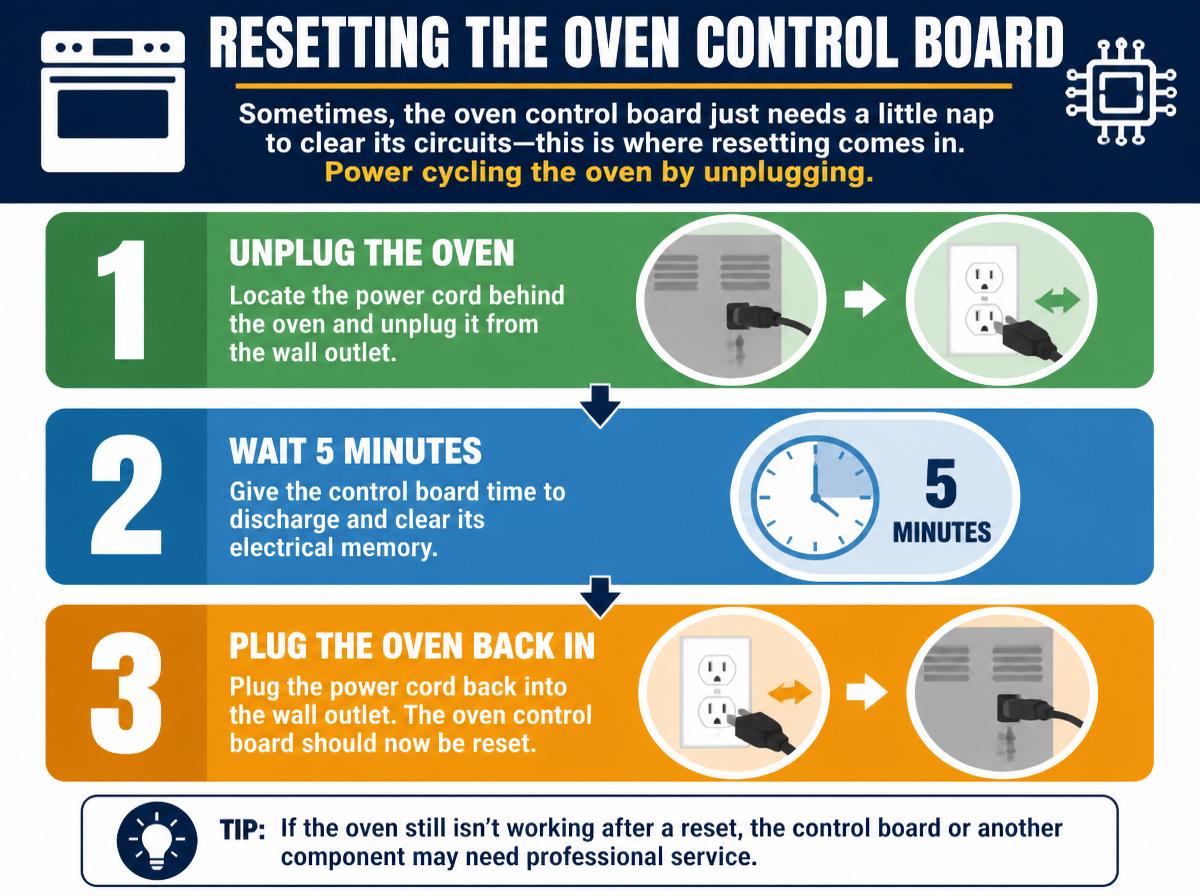
Sometimes, the oven control board just needs a little nap to clear its circuits—this is where resetting comes in. Power cycling the oven by unplugging it for a short time can often reset the system and fix temperature glitches. Let’s walk through simple steps to safely reset the control board and get things cooking smoothly again.
Power Cycle Procedure
Although it might seem like a simple trick, performing a power cycle on a GE oven’s control board can often clear up temperature glitches that leave meals half-baked. Before starting, safety precautions are crucial to avoid shocks or damage. Always unplug the oven or switch off the circuit breaker. Next, outlet verification is essential to confirm power is fully cut off—this means checking the socket with a tester or plugging in a small appliance to confirm no electricity flows.
Here’s a quick guide to remember:
- Turn off oven power completely.
- Wait about 60 seconds to let the control board reset.
- Restore power and test the oven.
This procedure often refreshes the system, easing temperamental ovens back to their reliable selves.
Control Board Reset Steps
When the oven’s temperature seems off despite power cycling, resetting the control board can often work wonders. First, safety precautions are key: unplug the oven or turn off its circuit breaker to avoid shocks. Next, wait about one minute before plugging it back in—this pause helps clear any stored errors. Many ovens then display error codes; careful error interpretation can guide if further fixes are needed or if the reset worked. If the oven powers on without error codes, test it by setting a temperature and watching for normal heating. This simple reset often resets tricky glitches that cause temperature misreads. Remember, staying calm and patient is your oven’s best friend—treat it well, and it’ll reward you with perfect meals.
When to Call a Professional Technician for Repair
Even the most confident DIYers can face moments where the oven’s temperature quirks go beyond simple fixes. At times like these, knowing when to call a professional technician saves stress, time, and potential safety hazards. If the oven is under warranty coverage, calling a pro makes sure repairs don’t void it. Plus, some problems need expert hands to avoid risks.
Here are three key signs to call a professional:
- Persistent temperature issues after following basic troubleshooting steps.
- Strange smells, sparks, or burning sounds during oven use.
- Faulty electronic control boards or wiring problems beyond reset attempts.
These situations can be tricky, and trying to fix them alone might cause more harm than good. A professional has specialized tools and knowledge, making the repair safer and more reliable. Don’t hesitate to ask for help—keeping your oven working well means happier cooking days ahead!
Frequently Asked Questions
Can Using Different Cookware Affect My GE Oven’s Temperature Accuracy?
Using different cookware can affect a GE oven’s temperature accuracy due to variations in material conductivity and pan size. Metals with higher conductivity heat faster, while larger pans distribute heat differently, impacting cooking results and perceived temperature consistency.
How Often Should I Have My GE Oven Professionally Serviced?
A GE oven should ideally undergo an annual checkup to guarantee peak performance and safety. Alternatively, a biennial inspection can suffice, but more frequent servicing may be required if usage is heavy or issues arise.
Does Altitude Impact the Oven Temperature Settings on My GE Oven?
Altitude affects air pressure and boiling point, altering oven outcomes. Oven operators often observe overcooked or undercooked outcomes. Adjusting temperature settings accordingly assures accurate, appetizing, and adaptable baking despite differing elevation challenges inherent to high altitudes.
Can Power Surges Cause Temperature Problems in a GE Oven?
Power surges, including voltage spikes, can cause temperature problems in a GE oven by damaging internal components. These electrical disruptions may lead to sensor failure, resulting in inaccurate temperature readings and uneven cooking performance.
Are There Any GE Oven Models Known for Frequent Temperature Issues?
Like shadows flickering across a flame, certain GE oven models have woven a recall history marked by owner complaints. These models occasionally exhibit temperature inconsistencies, haunting kitchens with unpredictability that disrupts culinary harmony and precise cooking.
Conclusion
Nearly 40% of home oven issues stem from temperature problems, but most are fixable with simple steps. By checking thermostats, sensors, and seals, anyone can bring their GE oven back to perfect cooking temps. If DIY feels tricky, it’s okay to call a pro—after all, even superheroes need help sometimes! Remember, a well-tuned oven means tastier meals and less stress, so keep calm and cook on with confidence.
Explore This Topic
- Back to Heating element repair
- Back to Cooking Appliances
Related guides in this cluster: