
DIY Fixes for Common Issues With Your GE Refrigerator
GE refrigerator owners can tackle common hiccups like uneven cooling by moving items away from blocked vents or checking the compressor for odd noises. Water dispenser troubles often clear up with filter replacements or unclogging kinked supply lines, while ice maker jams might need a motor or gear fix. Strange noises may stem from loose fans or door seals. Simple defrosting clears frost buildup, and coil cleaning boosts efficiency. Tackling these fixes feels doable—more helpful tips await to keep your fridge humming smoothly.
Key Takeaways
- Check and clear vents inside the fridge to restore proper airflow and prevent uneven temperatures.
- Replace water filters regularly to ensure clean water and fix dispenser flow issues.
- Unplug and inspect the ice maker motor and gears to resolve jams or motor faults.
- Tighten loose fan assemblies and door gaskets to reduce noise and prevent air leaks.
- Manually defrost by unplugging, removing food, and melting frost with warm water to clear frost buildup.
Troubleshooting Temperature and Cooling Problems
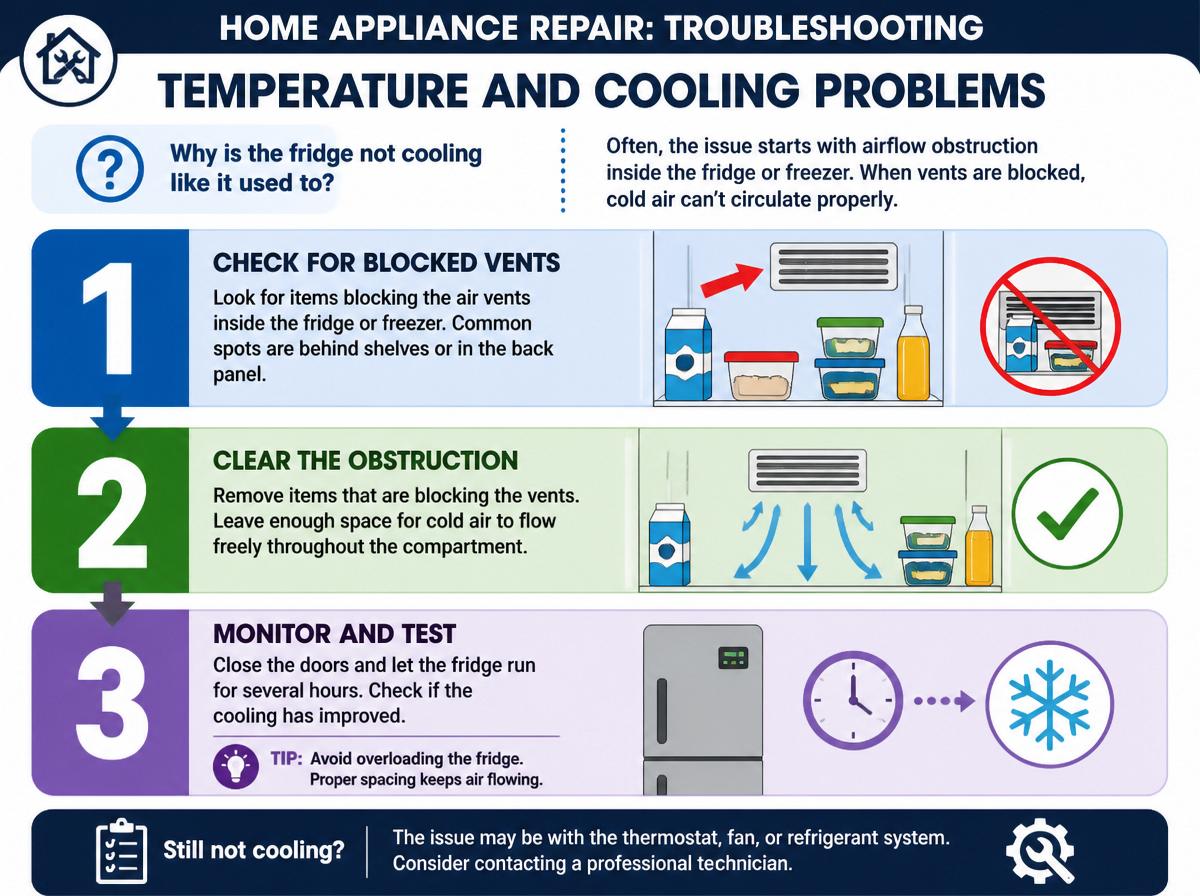
Why is the fridge not cooling like it used to? Often, the issue starts with airflow obstruction inside the fridge or freezer. When vents are blocked by food items or ice build-up, cold air can’t circulate properly, causing uneven temperatures. Checking and moving items away from vents is a simple fix anyone can try. Another culprit could be the compressor, which compresses refrigerant to keep things cold. Running basic compressor diagnostics helps determine if it’s working or needs professional attention. Listen for unusual noises or longer running times, which might signal trouble. While diving into compressor repairs isn’t always DIY-friendly, understanding its role empowers users to communicate effectively with technicians. By methodically eliminating airflow blockages and noticing any compressor warning signs, many cooling problems can be diagnosed early and resolved quickly. It’s always encouraging to remember—small steps can prevent big food meltdowns and keep your GE refrigerator happily humming.
Fixing Water Dispenser and Ice Maker Issues
Sometimes the water dispenser stops working or the ice maker gets jammed, causing everyday frustration that feels like a mini meltdown in the kitchen. Luckily, many of these issues can be fixed with simple steps like checking for blockages or swapping out the water filter. With a bit of patience and guidance, anyone can tackle these common problems and get their GE refrigerator back to making cold water and ice with ease.
Water Dispenser Not Working
How can a simple glass of water suddenly become a puzzling challenge? When the water dispenser on a GE refrigerator stops working, it’s less mystery and more fixable hiccup. First, check if the child lock is activated; this safety feature can block water flow to prevent spills. Next, explore app integration—a handy tool in many GE models—that allows users to monitor and reset the dispenser remotely. Sometimes, a quick reset through the app resolves electrical glitches. Also, inspect the water supply line for kinks or blockages. If the dispenser button feels stuck or unresponsive, clean around it gently. With a little patience and these clear steps, most issues can be tackled without calling for help. Keep calm, troubleshoot smartly, and soon hydration resumes!
Ice Maker Jam Troubleshooting
When did the last batch of ice become a mini-blockade rather than a cooling treat? Ice maker jams can be frustrating but often have simple fixes. Start with a motor inspection; the motor drives the ice ejector and sometimes gets stuck or loses power. If the motor hums but doesn’t turn, it might need replacement or lubrication. Next, check the gears—plastic gears inside can wear down or crack, causing the ice maker to jam mid-cycle. Gear replacement is a common, affordable fix that brings smooth operation back quickly. Be sure to unplug the refrigerator before starting; safety first! With a little patience and these straightforward steps, the ice maker can be back in action, serving cold cubes without the mini-blockade. Keep calm—it’s easier than it seems!
Replacing Water Filters
Although water filters may seem like simple parts, they play a huge role in keeping both the water dispenser and ice maker working smoothly. Replacing the filter regularly guarantees clean water and ice, preventing clogs and unpleasant tastes. Always choose a filter with proper filter certification to guarantee safety and performance. When it’s time to swap, turn off the water, twist out the old filter, and snap in the new one. Don’t forget eco disposal—recycling old filters helps reduce waste and protect the planet.
| Step | Tip | Reminder |
|---|---|---|
| Turn off water | Use certified filters | Check expiration date |
| Remove old filter | Follow manual guides | Avoid forcing the filter |
| Insert new filter | Flush water before use | Recycle old filters |
| Reset filter alert | Test dispenser & ice | Regular replacements |
Eliminating Strange Noises From the Fridge
Tackling strange noises coming from a fridge can feel like deciphering a secret code, but with a little patience and know-how, it’s entirely manageable. Often, these sounds stem from fan vibration—a common culprit. If the fan blades wobble or the motor mount loosens, a buzzing or humming noise may echo inside. Checking and tightening the fan assembly can quickly soothe this sonic disturbance. Equally annoying are panel rattles, which arise when panels aren’t snug or screws loosen over time. Gently pressing on or tightening these panels usually muffles the chatter. Sometimes, placing a thin foam or rubber padding between the panels and fridge frame can absorb vibrations, restoring peace. Remember, unplugging the refrigerator first is essential to stay safe during any checks. Tackling these minor fixes not only reduces noise but also prevents bigger issues. With these straightforward steps, any fridge owner can silence the racket and enjoy a quieter kitchen hum.
Addressing Door Seal and Leakage Problems
How can a small crack in a refrigerator door seal turn a trusty appliance into a sneaky water fountain? That tiny gap lets warm air in, causing moisture buildup and leaks. Fixing this often starts with gasket replacement. A worn or cracked gasket no longer keeps the cold air inside, so swapping it out can stop leaks efficiently. Before ordering a new gasket, checking the hinge alignment is a smart move. If the door is crooked or doesn’t close properly, even a perfect gasket won’t seal tight. Adjusting hinges is usually straightforward: loosening screws, repositioning the door, then tightening back up. Doing this prevents extra strain on the seal and keeps your fridge running smoothly. Remember, a well-sealed refrigerator saves energy and protects your food. So, embrace this small project with confidence—it’s easier than it sounds and definitely worth the effort to keep your kitchen dry and your GE fridge happy.
Resetting the Control Panel and Digital Displays
When a GE refrigerator’s control panel starts acting up or the digital display goes haywire, resetting it can often be the quickest way to bring things back to normal without calling in the pros. First, unplug the fridge for about five minutes; this simple break often resets the system. After plugging it back in, check if the touchpad calibration is off—sometimes buttons may feel less responsive, but a reset can fix that. If the issues persist, looking into a firmware update may be helpful. Firmware updates can improve the touchpad’s sensitivity and overall performance, but be sure to follow GE’s instructions carefully to avoid any hiccups. Remember, it’s okay to feel a bit unsure—the calm step-by-step resets, combined with a little patience, can turn digital chaos into smooth control. Tackling this reset yourself not only saves a service call but adds a little tech-savvy victory to your day!
Cleaning and Maintaining Refrigerator Coils
Regularly cleaning and maintaining refrigerator coils is one of those simple chores that can pay off big time, keeping your GE fridge working efficiently and saving energy. Dust, pet hair, and dirt love to cling to coils, making your fridge work harder and use more electricity, which no one wants. To tackle this, start with vacuum techniques—use the vacuum’s brush attachment to gently suck up loose debris. Next, select the right brush; a coil cleaning brush with soft, long bristles works wonders to dislodge stubborn grime without damaging the coils. Remember, unplug the fridge before you begin to stay safe. A little elbow grease here prevents bigger, costly problems later on. Plus, impressing friends with your coil-cleaning skills isn’t too shabby! By spending just a few minutes every few months on this task, your GE fridge will thank you with better cooling and lower energy bills. It’s simple, satisfying, and smart.
Repairing or Replacing Faulty Thermostats
Diagnosing a faulty thermostat can feel like decoding a secret message from your GE refrigerator, but it’s a task within reach for many home fixers. When the fridge isn’t cooling right, the thermostat might be the sneaky culprit. Here’s a simple way to tackle it:
- Check the Compatibility Guide: Make sure the replacement thermostat matches your GE model to avoid frustration later.
- Unplug and Open: Safety first! Disconnect power, then access the thermostat inside the fridge.
- Wiring Inspection: Look for loose or damaged wires; a bad connection can mimic a broken thermostat.
- Test or Replace: Use a multimeter to test the thermostat. If it’s faulty, swap it out, following the Compatibility Guide instructions.
With these steps, even beginners can handle thermostat repairs confidently. It’s less “tech mazeand more “aha moment,giving your fridge the cool boost it needs without calling in a pro.
Handling Frost Buildup and Defrosting Errors
Frost buildup can sneak in when seals aren’t tight or defrost systems misbehave, turning a fresh fridge into a chilly freezer mess. Sometimes, a simple manual defrost—just unplugging and letting nature do its thing—can work wonders without breaking a sweat. If frost keeps returning, checking the defrost timer might reveal the real culprit, making the fix just a turn away from being solved.
Causes of Frost Buildup
Although frost buildup can seem like a pesky problem, understanding why it happens makes fixing it much easier. Frost forms when moisture in the air freezes inside the freezer, but several common causes often trigger this nuisance:
- High humidity—Warm, moist air sneaks in when the fridge door is open too long, increasing frost quickly.
- Faulty insulation—Old or damaged seals let cold air escape and moist air enter, inviting frost formation.
- Frequent door openings—Every time the door opens, humid air rushes in and causes frost buildup.
- Clogged or broken defrost system—If the automatic defrost isn’t working right, frost accumulates instead of melting away.
Knowing these helps tackle frosting confidently—no more shivering in front of a frosty trap!
Manual Defrost Techniques
When frost decides to throw an unexpected party inside a freezer, knowing how to handle it manually becomes a handy skill. First, unplug the refrigerator to make sure Safety Precautions are met. Use soft tools like plastic scrapers for Tool Selection, avoiding metal ones that can harm surfaces. Patience is key—let the frost melt naturally or gently chip it away. Here’s a quick guide:
| Step | Tip |
|---|---|
| Unplug appliance | Prevents shocks or damage |
| Remove food | Keeps items safe from spoiling |
| Use warm water | Speeds up frost melting |
| Scrape gently | Avoids puncturing walls |
| Dry fully | Prevents new frost buildup |
With care and the right approach, frost won’t stand a chance, making your GE fridge happy again in no time!
Troubleshooting Defrost Timer
How can one tell if the defrost timer in a GE refrigerator is causing trouble? Often, frost buildup signals the timer isn’t switching to defrost mode correctly. To check, follow these steps for timer diagnostics:
- Locate the defrost timer inside the fridge, usually behind the kick plate or control panel.
- Turn the timer dial slowly; listen for a click—the sound signals it’s advancing through cycles.
- Use a multimeter to test motor continuity; no continuity means the timer motor may be faulty.
- If the timer doesn’t advance or lacks motor continuity, replace it promptly.
Frequently Asked Questions
How Do I Level My GE Refrigerator Properly?
To level a GE refrigerator properly, one should adjust legs at the bottom corners until the unit is stable. Ensuring correct door alignment is essential for proper sealing and efficient operation of the refrigerator.
What’s the Best Way to Change the Fridge’s Interior Light Bulb?
The best way to change the fridge’s interior light bulb involves unplugging the refrigerator, removing the bulb cover, performing the Bulb Replacement carefully, and conducting a Wiring Inspection to confirm secure connections before reassembling and restoring power.
How Can I Safely Move My GE Refrigerator Without Damage?
Moving a GE refrigerator without damage is like guarding a fragile treasure: remove the doors to ease passage, secure shelves inside, then use an appliance dolly to maintain stability, protecting both the appliance and its journey.
What Type of Water Filter Works With My GE Fridge?
The compatible water filter for a GE refrigerator must verify filter compatibility with the model. It should also possess filter certification, such as NSF/ANSI standards, to guarantee safety and effective contaminant removal from the water supply.
How Often Should I Replace the Fridge’s Air Filter?
The fridge’s air filter should be replaced as religiously as clockwork, roughly every six months, according to manufacturer guidance. Deviating from this usage schedule risks compromising air quality and appliance efficiency, warranting diligent, timely replacement.
Conclusion
Tackling common GE refrigerator quirks may feel like mini adventures, but with simple fixes, these “personality traitsquickly become manageable. By gently addressing issues like cooling hiccups, water quirks, or curious sounds, anyone can keep their fridge running smoothly. Remember, a little patience and straightforward tools go a long way. So, roll up those sleeves—success is just a few friendly tweaks away, turning frustration into rewarding, hands-on triumph.
Explore This Topic
- Back to ice maker troubleshooting
- Back to GE appliances
Related guides in this cluster:
