
Quick Solutions for Common Problems With GE Profile Ovens
When GE Profile ovens act up, quick fixes can save the day! For uneven heating, check heating elements and avoid stacking trays too close. If the self-cleaning feature won’t start, make sure the door is locked tight. For control panel hiccups, try resetting the oven by unplugging it. Don’t forget to inspect door seals for gaps! Finally, if the igniter isn’t firing, clean it off to remove any debris. Want to discover more helpful tips?
Key Takeaways
- Check heating elements and recalibrate the thermostat for accurate temperature readings and even cooking results.
- Regularly clean the control panel and inspect wiring to resolve control panel and electrical issues.
- Verify the oven door is tightly sealed and clean to maintain energy efficiency and consistent heat distribution.
- Ensure the igniter and gas supply are functioning properly to prevent ignition and shutdown problems.
- Schedule periodic professional maintenance to keep all oven functions operating correctly and prevent future issues.
Troubleshooting Uneven Heating Issues
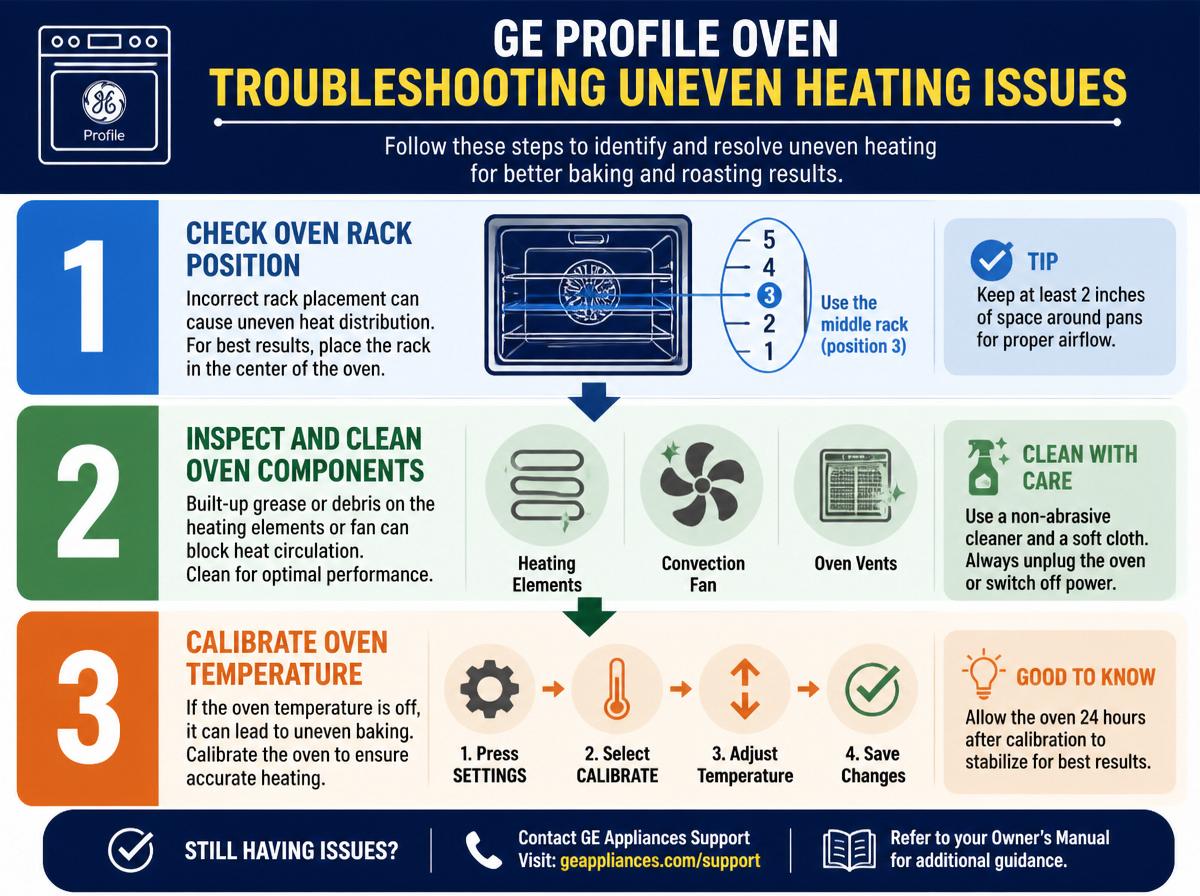
When trying to whip up a delicious meal, encountering uneven heating in a GE Profile oven can be frustrating. Imagine baking cookies only to find some burnt while others remain doughy. This uneven cooking often happens because of poor heat distribution. It’s not just you—many home cooks face this challenge!
To troubleshoot, first, check the oven’s heating elements. Sometimes, a broken element can cause hot or cold spots. Next, consider the placement of your dishes. Stacking too many trays or placing them too close can block airflow and lead to uneven results. Using an oven thermometer can also help assess how evenly the oven heats.
For the best outcome, try rotating your dishes halfway through cooking. Remember, cooking should be fun, not a battle. Keep experimenting, and soon, you’ll be whipping up perfect meals in no time!
Resolving Self-Cleaning Function Problems
Keeping an oven clean can feel like a chore, but it’s one that can make cooking more enjoyable. For those experiencing issues with the self-cleaning function of a GE Profile oven, helpful solutions exist. Here are some self-cleaning tips to keep in mind:
- Check the Door Lock: Verify the oven door is properly closed and the lock mechanism engages. This is essential for the self-cleaning cycle to work.
- Inspect the Wiring: Look for any loose or damaged wires connected to the self-clean feature. A simple fix could solve many troubles.
- Follow a Maintenance Schedule: Create a regular cleaning timetable to prevent buildup, making future self-cleaning easier and more effective.
Taking these steps can alleviate the frustration of a malfunctioning self-cleaning oven. With a little patience and attention, a clean oven is within reach, making every cooking experience a delight.
Fixing Control Panel Malfunctions
Control panel malfunctions can turn a cooking adventure into a puzzling challenge. When buttons stick or screens stay blank, it’s time to take a closer look. Often, a simple control panel reset can work wonders. This involves unplugging the oven for a few moments before plugging it back in. It’s like giving the appliance a little nap—everyone needs one sometimes!
If the issues persist, a wiring inspection might be necessary. Loose or damaged wires could be the culprits behind the malfunctions. Carefully checking connections can help identify the problem. Remember, safety first! Always turn off the power before inspecting.
Addressing Oven Door Sealing Issues
Oven door sealing issues can be a sneaky problem, often leading to temperature troubles and uneven cooking. If the oven door isn’t sealing well, it’s time to take action! Here are some tips for effective oven seal maintenance:
- Check for Damage: Inspect the oven door seal for cracks or wear. A damaged seal can let heat escape.
- Clean the Seal: Wipe down the seal with warm, soapy water. Food crumbs can interfere with proper sealing!
- Consider Replacement Options: If the seal is torn or too old, it might be time to replace it. Replacement seals are usually easy to find and install.
With a little effort, maintaining a great seal can boost cooking results and save energy! Don’t worry—addressing these issues makes cooking more enjoyable. Happy baking!
Dealing With Ignition and Gas Supply Problems
When it comes to cooking with a GE Profile oven, ignition and gas supply issues can really put a damper on meal prep. First, checking the ignition system is key; a little spark can make a big difference! Don’t forget to look at the gas supply lines too—making sure everything is flowing can help get your oven back in action and dinner on the table.
Troubleshooting Ignition Issues
Have you ever felt a bit puzzled when the flames don’t spark to life in a GE Profile oven? Ignition troubleshooting can feel like a riddle! However, don’t fret; there are simple steps to address gas ignition issues. Here are three primary checks to make:
- Clean the Igniter: Sometimes, food debris can block the igniter. A gentle wipe can help restore its spark.
- Listen for Sounds: A clicking noise means the igniter is trying to work. No sound? That might indicate a problem.
- Check for Gas Flow: Make sure the gas supply is turned on.
Checking Gas Supply Lines
Connecting to the gas supply lines can feel a bit intimidating, yet it is an essential step in ensuring that a GE Profile oven ignites properly. To begin, always prioritize gas line safety. Before checking, confirm that the gas is turned off. Inspect the lines for any signs of wear, leaks, or damage, as proper pipe maintenance is key to preventing accidents. If any issues arise, calling a professional is wise! When everything appears safe, reconnect the lines firmly. Remember, a snug connection can make all the difference in ignition. After completing the checks, turn the gas back on and test the oven. With a little confidence and care, users can tackle these lines with ease, ensuring their culinary adventures can commence safely!
Solutions for Temperature Calibration Errors
Although temperature calibration errors in GE Profile ovens can be frustrating, there are simple steps to help fix the issue. With a little patience and some easy adjustments, anyone can tackle these problems like a pro.
Here are three actionable steps to make calibration adjustments:
- Check the Temperature Sensor: Verify the temperature sensor is clean and securely in place, as any dirt or misalignment can lead to inaccurate readings.
- Use an Oven Thermometer: Place a reliable oven thermometer inside the oven. This will help confirm the actual temperature and highlight any discrepancies.
- Adjust the Settings: If the thermometer shows a significant difference from the oven’s readout, consult the user manual for detailed instructions on how to make necessary calibration adjustments.
Repairing Faulty Interior Lighting
Faulty interior lighting in GE Profile ovens can be a common frustration for many users, leaving them in the dark (literally!) while trying to cook. Fortunately, identifying lighting issues and applying easy fix techniques can brighten up the oven experience in no time. With a little patience and some simple steps, anyone can tackle this challenge and get back to cooking with confidence!
Common Lighting Issues
Many homeowners encounter lighting issues in their GE Profile ovens, which can make baking or broiling a bit tricky. If the oven light goes out, it could be due to a burnt-out bulb or lighting circuit issues. Here are three common problems to look out for:
- Burnt-out Bulb: This is the most common issue. Timely oven bulb replacement can solve the problem quickly.
- Loose Connections: Sometimes, the bulb itself may be fine, but a loose connection can cause the light to flicker or not turn on at all.
- Electrical Problems: If there’s no light and the bulb is fine, it may indicate a deeper lighting circuit issue.
Identifying these issues can empower homeowners to take action, restoring bright baking adventures!
Easy Fix Techniques
When it comes to fixing the interior lighting of a GE Profile oven, there are some straightforward techniques that can bring back that comforting glow. First, check the light bulb; it could simply be burnt out. Replacing it is an easy task! Just remember to unplug the oven or turn off the circuit breaker for safety. For a clearer view, a bit of quick cleaning can work wonders; use a damp cloth to wipe away any grease that may be blocking light. Regular oven maintenance tips also suggest checking the light cover for any cracks which can dim brightness. With these simple hacks, even a novice can make their oven shine again! Happy fixing!
Fixing Overheating and Shutdown Issues
Sometimes, a GE Profile oven may start to overheat or unexpectedly shut down, leaving home cooks feeling frustrated and unsure about what to do next. Fortunately, there are a few steps to take to address these issues easily.
- Fixing thermostat issues: Check the thermostat for accuracy. Sometimes, it might need recalibrating or replacing to guarantee the oven heats correctly.
- Addressing wiring problems: Inspect the electrical wiring for any signs of damage. Frayed or loose wires can cause power interruptions, leading to shutdowns.
- Regular maintenance: Clean the oven regularly to prevent grease build-up. This helps in avoiding overheating and guarantees all components function properly.
Frequently Asked Questions
How Do I Reset My GE Profile Oven to Factory Settings?
To reset a GE Profile oven to factory settings, one should refer to the user manual for specific resetting methods. Typically, this involves maneuvering through the settings menu and selecting the factory reset option.
What Should I Do if My Oven Timer Isn’t Working?
If the oven timer isn’t working, one should check oven settings for proper configuration. Inspect connections for damage and verify the timer has power. If timer issues persist, consulting the manual or a technician is advisable.
Can I Replace the Oven Light Bulb Myself?
Yes, the oven bulb can be replaced independently. However, it’s essential to follow safety precautions. Disconnect the power first, patiently read the instructions, and then proceed with replacing the bulb, ensuring everything is properly secured.
Why Is My Oven Fan Running Continuously?
The oven fan may run continuously due to a faulty thermostat, a malfunctioning control board, or the self-cleaning feature being active. Continuous operation can lead to excessive wear and potential overheating issues if not addressed promptly.
Is There a Way to Unlock My Oven’s Control Panel?
To release the oven’s control panel, the user should typically press and hold the “Lock” button for three seconds. This method often resolves panel issues related to accidental locking and restores normal functionality.
Conclusion
In the world of troubleshooting GE Profile ovens, there’s always hope, even in those pesky moments of uncertainty. With just a little patience and the right guidance, anybody can tackle these kitchen conundrums. Whether it’s uneven heating or a stubborn control panel, solutions are often just a few steps away. So, grab your tools, roll up your sleeves, and immerse yourself in fixing your oven. Who knows? You might just uncover your inner appliance expert, and maybe even share a laugh or two along the way!
Explore This Topic
- Back to GE Profile
- Back to Cooking Appliances
Related guides in this cluster: