
How to Reset a KitchenAid Dishwasher: All Models Guide
A KitchenAid dishwasher reset typically involves holding a specific combination of buttons for 3–5 seconds, then waiting 60–90 seconds for the control board to reboot. The exact sequence varies by model type, but the most common method works on 80% of units made after 2010. If the dishwasher is stuck mid-cycle, flashing lights, or not starting, a reset clears temporary software glitches without needing a service call.
Before You Try a Reset – Confirm These 6 Quick Checks
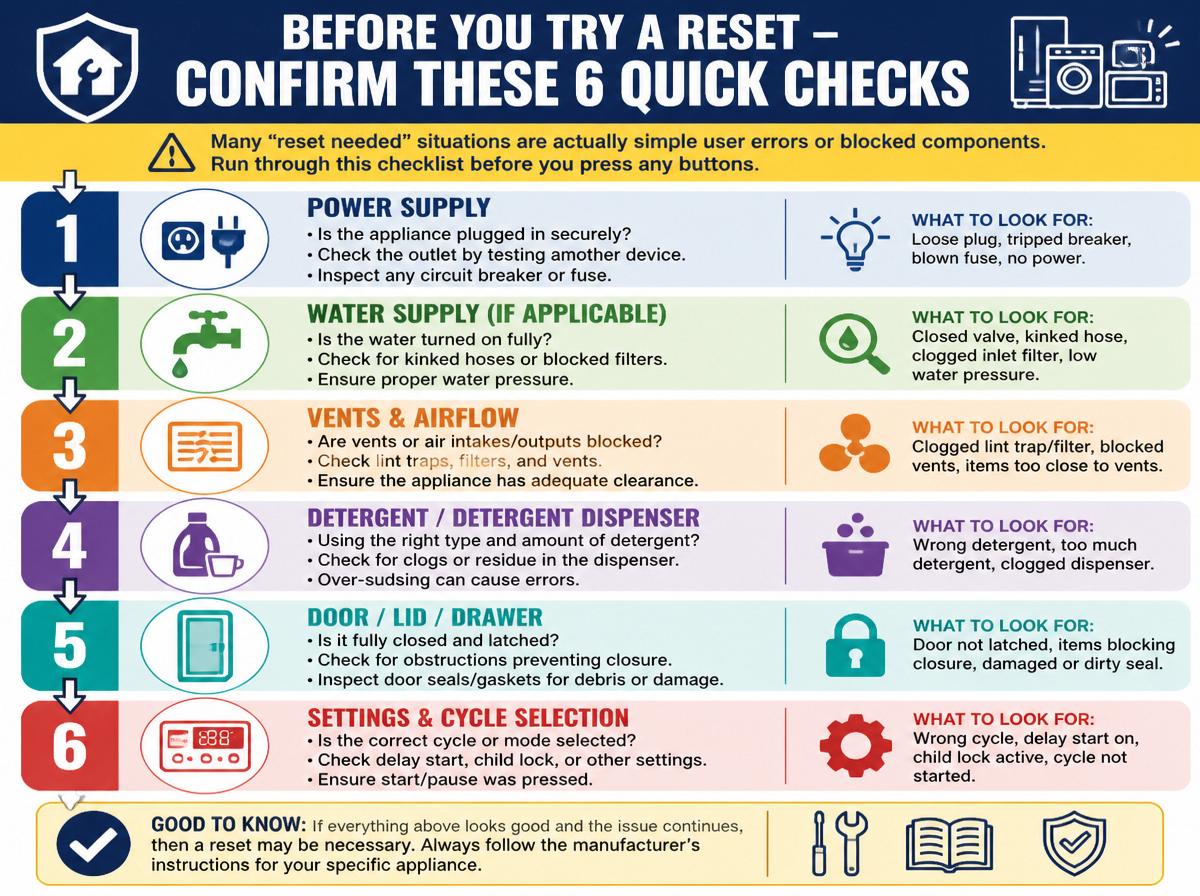
Many “reset needed” situations are actually simple user errors or blocked components. Run through this checklist before you press any buttons:
- Power supply – Is the dishwasher plugged in and the breaker on? A tripped GFCI or blown fuse can look like a control board failure. If you find a tripped GFCI, reset it and test the dishwasher. If it works, you’re done. If not, proceed with the reset.
- Door latch – Does the door click fully closed? The dishwasher will not accept any commands if the latch is not engaged.
- Control lock – Are the buttons unresponsive? Look for a picture of a padlock on the display. Hold the Sanitize or Heated Dry button for 3 seconds to unlock.
- Cycle completion – Is the dishwasher still running? Wait for the cycle to finish naturally. Interrupting mid-cycle can cause error codes.
- Filter cleanliness – A clogged filter can trigger a fault. Remove the bottom rack and twist the filter assembly; rinse it under hot water.
- Previous power outage – After a brownout or surge, the control board sometimes needs a manual reset. This is the most common scenario that a reset will fix.
If all six checks are clear and the dishwasher still won’t operate, proceed to the reset procedure.
The Universal Three-Button Reset
This is the primary reset method for KitchenAid dishwashers with a front control panel (buttons visible when door is open). It resets the electronic control board without affecting stored custom settings.
What to do:
- Open the door and make sure the dishwasher is idle (not mid-cycle). If it is running, press Cancel/Drain and wait 2 minutes for draining to finish.
- Press and hold the Heated Dry button.
- While holding Heated Dry, press and hold Normal Wash (or Normal). Keep both held.
- Press and hold Start/Resume (the third button). You are now holding three buttons simultaneously.
- Hold all three for 5 seconds.
- Release all buttons. The display should show a sequence of lights flashing or a brief countdown.
- Close the door. The dishwasher will enter a drain cycle (1–2 minutes) and then shut off.
- Open the door and select a short rinse cycle, then press Start/Resume to verify the reset worked. The dishwasher should begin filling and running normally. If it immediately stalls or flashes error lights again, the reset did not clear the fault – see the failure mode section below.
Common mistake to avoid: Do not release any button before 5 seconds, or the reset will not register. If you see no reaction, keep holding a full 8 seconds.
Manufacturer guidance: “If the dishwasher does not start or stops during a cycle, press Cancel/Drain and wait for the unit to drain. Then try the three-button reset. If the problem persists, consult the error code flashing pattern before calling for service.” – KitchenAid Owner’s Manual (KDFE104HPS)
Model-Specific Reset Sequences
Not all KitchenAid dishwashers use the same button combination. Use this table to match your model family to the correct reset method.
| Model Family | Reset Sequence | Typical Display Feedback |
|---|---|---|
| Front-control (KDFE, KDTE, KDPE series) | Hold Heated Dry + Normal + Start for 5 sec | All lights flash 3 times, then drain cycle |
| Top-control (KDTM, KDPM series) | Hold Cancel/Start for 3 sec (single button) | Display shows “rE” or “rSt” briefly |
| Older models (before 2010, no display) | Unplug for 60 seconds, then plug back in | None – power cycle only |
Front-Control Models
Follow the universal three-button reset above. These models include a visible button panel on the top edge of the door when open. The reset works on KDFE104, KDTE104, KDPE234, and similar.
Top-Control Models
These have the control buttons hidden on the top edge of the door (visible only when the door is partially open). The reset is simpler:
- Press Cancel or Start/Resume once to stop any active cycle.
- Press and hold the Start/Resume button alone for 3 seconds.
- The display will show “rE” or “rSt”. Release the button.
- Close the door. A 60-second drain cycle runs, then the unit shuts off.
- Verify the reset by starting a quick rinse cycle. If the dishwasher runs normally, the reset succeeded. If the error code reappears, move to the failure mode section.
Common mistake: Holding the button too long (more than 5 seconds) can trigger a factory restore on some models, which wipes custom cycle settings. Stick to exactly 3 seconds.
Older Models (Mechanical Timers, No Digital Display)
These units do not have a push-button reset. The only reliable method is a hard power reset:
- Unplug the dishwasher from the wall outlet (or flip the breaker off).
- Wait 60 seconds minimum – some units need 5 minutes to drain internal charge.
- Plug back in (or flip breaker on).
- Verify the reset by opening the door, selecting a rinse cycle, and pressing start. The unit should begin with a fresh control sequence. If the timer motor clicks but the dishwasher does not fill, the timer motor may be seized – a reset will not fix that.
Detect early failure: If you hear a constant buzzing sound from the control panel instead of a normal click-and-fill sequence, the timer motor is likely stuck and requires replacement.
What to Do If the Reset Fails – The Stuck Control Board Failure Mode
The most common failure that ordinary resets cannot fix is a control board latch-up – the board enters a fault state that even a button sequence won’t clear. You can detect this early:
- Symptom: After holding the three buttons for 5 seconds, nothing happens. No lights flash, no drain starts.
- Cause: A power surge or a stuck relay on the control board has locked the processor. The board is not responding to user input.
- Check: Try a hard power reset (unplug for 2 minutes). If that fails, you have a hardware issue. One realistic branch: after unplugging for 2 minutes, plug back in and attempt the three-button reset again. If the dishwasher responds now, the hard reset cleared the latch. If it still does nothing, the control board needs replacement.
- Fix: Replace the control board (part number varies by model, typically $100–$200) or call a technician. This is not a DIY repair unless you have soldering experience.
Stop/Escalation signal: If the dishwasher emits a burnt smell or you see visible scorch marks on the control board, stop immediately. Unplug the unit and do not attempt further resets. This indicates a short circuit that could cause a fire.
A less common but fixable failure is a stuck keypad membrane. If the buttons feel mushy or unresponsive, the membrane may be shorted. This can be cleaned with isopropyl alcohol and a soft cloth – do not use water.
Verification step after any repair: Whether you replaced the board or cleaned the keypad, run a full cycle with no dishes. The dishwasher should progress through fill, wash, drain, and dry without stopping or error lights. If it halts again, the problem lies deeper – probably a wiring harness or sensor fault.
When to Stop DIY and Call a Technician
Not every issue is a reset problem. These clear signs mean you need professional help:
- Error codes that repeat – Most KitchenAid dishwashers flash a series of lights to indicate faults. For example, 2 flashes of the Clean light means the thermistor is open; 3 flashes means a heating element failure. If you have already reset and the same code returns, a component is broken. Start by understanding the beeping and flashing clean light on your kitchenaid dishwasher – that pattern tells you which component is failing.
- No power to the panel – If the control board is completely dead (no lights, no beeps) even after a hard reset, the power supply module or wiring harness has failed.
- Water not draining – A pump that hums but does not empty usually means a clogged drain pump or a failed pump motor. The reset may attempt a drain, but if the pump is mechanically stuck, it will not clear.
- Leaks under the dishwasher – A reset will not fix a leaking hose, seal, or float switch. Address leaks immediately to avoid floor damage.
If you encounter any of these, save time and risk by scheduling a service visit. In many cases, similar reset logic applies, but dishwashers have their own fault patterns.
Frequently Asked Questions
Q: Will resetting my KitchenAid dishwasher delete my custom cycle settings?
A: The three-button reset does not erase saved preferences. Only a factory restore (holding the same buttons for 15 seconds on some models) clears custom options. Check your manual for the exact hold time for your model.
Q: How long should I wait after a reset before testing?
A: Give the dishwasher 2 minutes after the drain cycle completes. Unplugging and plugging back in can take up to 5 minutes for the capacitors to discharge. Do not repeatedly press buttons during this wait.
Q: My dishwasher keeps needing a reset every few cycles. What’s wrong?
A: Recurring resets point to a failing control board, a weak power supply, or an intermittent door switch. A technician can test the specific part by measuring voltage at the control board during operation.
Q: Can I use a reset to clear a stuck detergent dispenser?
A: No. A reset only affects the electronic controls. If the detergent cup does not open mid-cycle, the wax motor or spring mechanism is faulty. Use a step by step guide to clean a kitchen aid dishwasher to physically free the latch or replace the dispenser assembly.
Q: Is it safe to leave the dishwasher unplugged for an hour?
A: Yes. Dishwashers use low-voltage control boards. Unplugging for up to an hour poses no risk. If you need to leave it disconnected overnight, make sure the door is slightly open to prevent odors and to keep the door seal from deforming.
After a successful reset, run a short rinse cycle with a dishwasher cleaner to remove any residue from the interrupted cycle. To prevent future faults, follow our guide on how to clean a kitchenaid dishwasher machine effectively. If the problem returns within a week, it is time to inspect the control board or call a professional.