
How to Reset Maytag Appliances: Washer Dryer Oven Fridge Guide
Most Maytag resets fail because people plug the appliance back in too quickly. The counter‑intuitive truth: after unplugging, you need to wait at least 60 seconds (and often longer) for internal capacitors to fully discharge. Plugging back in after 10–20 seconds often leaves error codes active, making you think the reset didn’t work when it was just cut short.
The Universal Power‑Cycle Reset (Works on All Maytag Appliances)
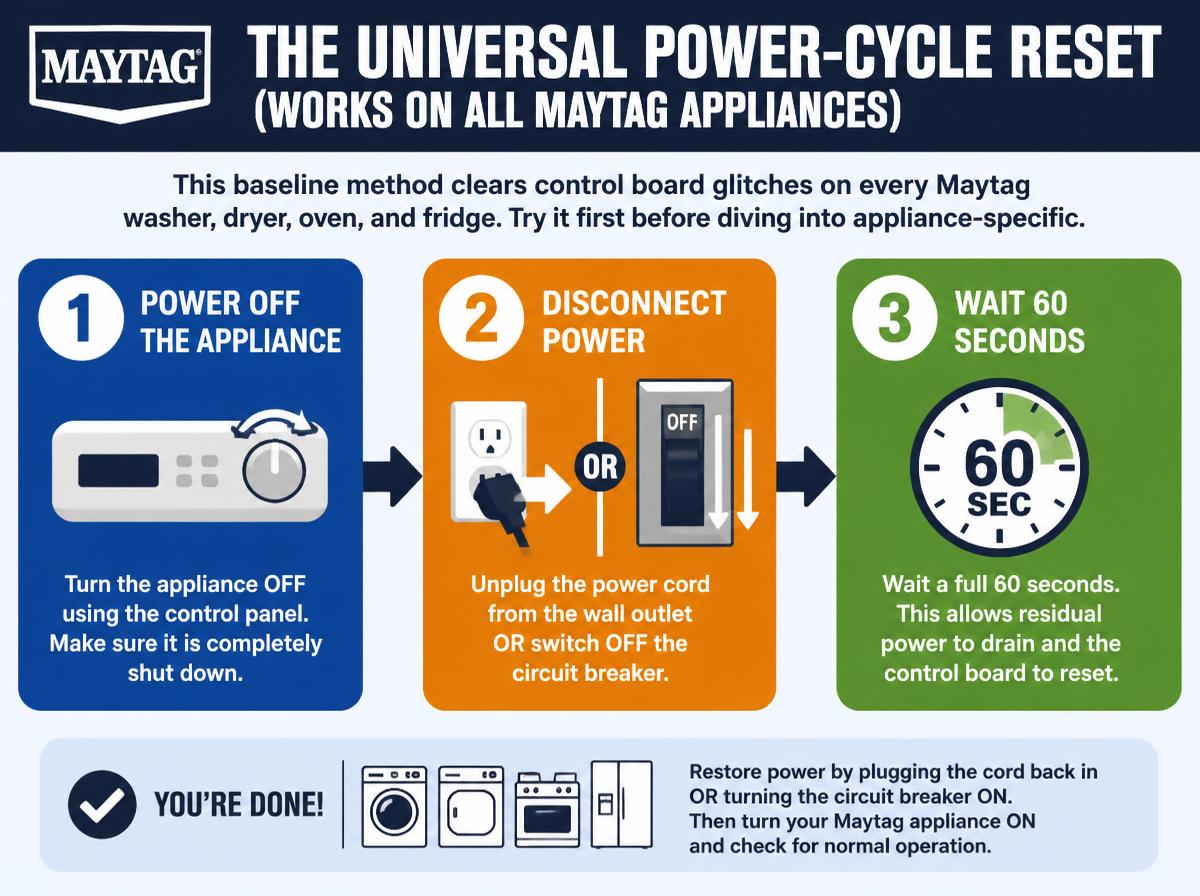
This baseline method clears control board glitches on every Maytag washer, dryer, oven, and fridge. Try it first before diving into appliance‑specific button sequences.
Step 1: Unplug the appliance. For hardwired electric ovens, flip the dedicated circuit breaker instead.
Step 2: Wait 60 to 120 seconds. For gas dryers or any appliance that uses gas, extend the wait to 5 full minutes to allow residual gas to dissipate.
Step 3: Plug the appliance back in (or restore breaker power).
Step 4: Test with a short cycle: run a rinse+spin on the washer, a timed dry on the dryer, preheat the oven to 350°F, or listen for your refrigerator compressor to kick on within 5 minutes.
Likely cause of failure after reset: If the error code comes back immediately or mid‑cycle, the problem is likely a hardware fault (e.g., thermistor, motor, heating element) – not a control board glitch. Repeated resets won’t fix it. Stop and run diagnostic checks.
Common mistake: Restoring power after only 10–20 seconds. Capacitors on Maytag boards can hold charge for up to 60 seconds, and cutting that short may not reset the logic.
Maytag’s service documentation advises: Never attempt a reset if the oven is still hot (above 150°F). The control board may interpret high temperature as a sensor fault and lock into a permanent error.
Resetting a Maytag Washer – Models and Sequences
Maytag washers (Bravos, Front‑Load, top‑load dial models) often need a factory reset after error codes like F51, F21, or Sud.
Identify Your Control Type
- Dial + button models (older top‑loaders): One knob and a few push buttons.
- Digital display with touch buttons (newer Bravos ML or MHW): Full LCD or LED interface.
Dial Models – Quick Reset
- Turn the cycle selector knob to “Spin Only.”
- Press and hold “Start/Pause” for 3 seconds.
- Wait for the lid to unlock (if applicable), then turn the knob to “Off” and unplug for 60 seconds.
Digital Models – Factory Reset Sequence
- Press “Power” to turn the washer off.
- Press and hold “Start/Pause” while pressing “Soil Level” (or “Temp”) three times within 5 seconds.
- The display should show “FACTORY” or “888” briefly. Release buttons.
- Turn the washer off and unplug for 60 seconds.
Checkpoint: If the display shows “rL” or “Loc” after reset, the control lock is on. Press and hold “Control Lock” (padlock icon) for 3 seconds to unlock.
Stop signal: If error code F51 (drain pump failure) returns after reset, the pump or its wiring is faulty – do not keep resetting. Replace the pump or call a technician.
For model‑specific sequences covering Bravos and commercial variants, see our complete how to reset your maytag washing machine guide.
Resetting a Maytag Dryer – Sequence and Pitfalls
Most Maytag dryers (electric and gas) reset with a simple power cycle, but electronic‑display models need a dedicated button sequence for persistent errors like F01 or F90.
Step 1: Power Cycle (First Try)
- Unplug the dryer (or flip the breaker) for 5 full minutes.
- Plug back in and press “Start.” If it runs, the reset worked.
Step 2: If Error Codes Persist
- Open the door and press “Start” for 15 seconds to discharge residual power from the control board.
- Close the door.
- Press “Power”, then immediately press “Start” and hold both for 5 seconds. The display should flash.
- Release and wait for the dryer to beep twice.
Likely cause of recurring error: A clogged lint screen or restricted exhaust duct often mimics a control board failure. Always clean the lint screen after every load and check the exhaust duct for buildup. Restricted airflow can cause heating elements to fail prematurely.
Stop signal: If the same error code remains after this sequence, the main control board may be faulty – call a technician.
Common mistake: Forgetting to clean the lint screen before resetting. It’s a safety requirement, not just maintenance. Our how do you reset your maytag dryer using effective methods guide covers gas dryer igniter and thermistor checks if errors persist.
Resetting a Maytag Oven or Range – Temperature Sensor Awareness
Maytag ovens (gas and electric) store error codes like F3, F5, or E0. Never rush a reset when the oven is still hot.
Step 1: Cool Down and Power Cycle
- Turn the oven off and remove racks if needed.
- Unplug the range (or shut off the breaker for hardwired models).
- Wait 5 minutes for electric oven capacitors to discharge.
- Plug back in.
Step 2: If Error Codes Remain – Button Pad Reset
- For models with a numeric keypad: press “Bake” and “Broil” simultaneously for 5 seconds.
- For knob + display models: turn the oven selector to “Bake”, then press “Start” and hold for 10 seconds.
Practical judgment: Error code F3 reappearing after reset usually means the temperature sensor (thermistor) is failing – replace it. For gas ranges, also check the oven door switch; a sticking switch can cause E0 errors.
Success check: Set the oven to 350°F and preheat for 10 minutes. No error code reappearing means the reset worked.
Resetting a Maytag Refrigerator – Defrost and Compressor Checks
Maytag refrigerators (bottom‑freezer and side‑by‑side) rarely need a full reset – most issues stem from a defrost cycle hiccup or ice maker jam.
Step 1: Quick Defrost Initiation
- Press and hold “Freezer” and “Fridge” (or “Temp” buttons) for 5 seconds.
- The display should flash “dF” or “00”.
- Close the doors and wait 30 minutes; the fridge will enter a forced defrost.
Step 2: Hard Reset for Control Panel Freeze
If buttons are unresponsive:
- Unplug the refrigerator for 10 minutes (longer wait due to compressor run capacitor).
- Plug back in and check the display.
- If the ice maker shows “Fault” or “Err”, press “Ice” and “Light” simultaneously for 3 seconds.
Stop signal: If the compressor stays silent for more than 10 minutes after plugging in, the start relay may be defective – do not keep pressing buttons. Replace the start relay or call a technician.
Reset Method Comparison Table
| Appliance | Most Common Reset Action | Typical Reset Time | Quick Check After Reset |
|---|---|---|---|
| Washer | Unplug 60s + button sequence (varies) | 2–5 min | Run rinse+spin cycle |
| Dryer | Unplug 5 min + Start button hold | 6–8 min | Run a timed dry cycle |
| Oven | Unplug 5 min + Bake/Broil combo | 6–10 min | Preheat to 350°F |
| Refrigerator | Unplug 10 min + defrost sequence | 10–15 min | Listen for compressor after 5 min |
Before You Reset: A Quick Decision Aid
Use these five checks before investing time in a button sequence. If any check fails, fix that first.
- [ ] Power supply: Is the appliance plugged in securely? Test the outlet with a lamp.
- [ ] Circuit breaker: Has a breaker tripped? Flip it off and on.
- [ ] Door/lid switch: Is the door fully closed? Many Maytag models refuse to reset if the door is ajar.
- [ ] Error code reference: Look up the exact error code (e.g., F51, F90) before resetting – some codes indicate a hardware fault that reset won’t fix.
- [ ] Cleanliness: For dryers, clear the lint screen and exhaust duct. For refrigerators, remove dust from the condenser coils. Restricted airflow is a common cause of false errors.
Frequently Asked Questions
Can I reset my Maytag appliance by holding the Start button for 10 seconds?
Yes, on many washers and dryers a 10‑second hold of Start/Pause disengages control lock and clears temporary glitches. It won’t fix persistent error codes, but it’s a good first try.
Why does my Maytag oven show E0 after a power outage?
E0 often means the control board lost calibration during the outage. Perform the button pad reset (Bake + Broil for 5 seconds) after the oven cools. If E0 reappears after normal use, replace the temperature sensor.
How long should I unplug a Maytag refrigerator to reset the ice maker?
At least 10 minutes. A shorter pause may not drain the capacitor that keeps the ice maker control board active. After plugging back in, wait 24 hours for the ice bin to refill fully.