
Essential Whirlpool Refrigerator Reset Methods: What They Do
Whirlpool refrigerator reset methods are simple fixes that zap minor glitches and clear error codes to keep things running smoothly. A quick power cycle unplugging, waiting, then plugging back in refreshes the system. The control panel can wipe error messages with a few button taps, while the ice maker reset revives frozen fun by clearing jams. Adjusting temperatures or doing a factory reset tackles stubborn issues but remember to note settings first! Keep going to explore how these tricks bring your fridge back to life effortlessly.
Key Takeaways
- Basic resets clear minor electronic glitches by unplugging the fridge and pressing specific control panel buttons.
- Control panel error resets erase displayed error codes and restart the system’s logging functions for fresh monitoring.
- Ice maker resets involve holding a reset button to restore function, resolve jams, and improve ice production efficiency.
- Factory resets restore default settings but erase custom preferences and may affect warranty or lock features.
- Persistent issues may require professional service as resets alone cannot fix complex refrigerator faults.
Understanding the Basic Reset Procedure for Whirlpool Refrigerators
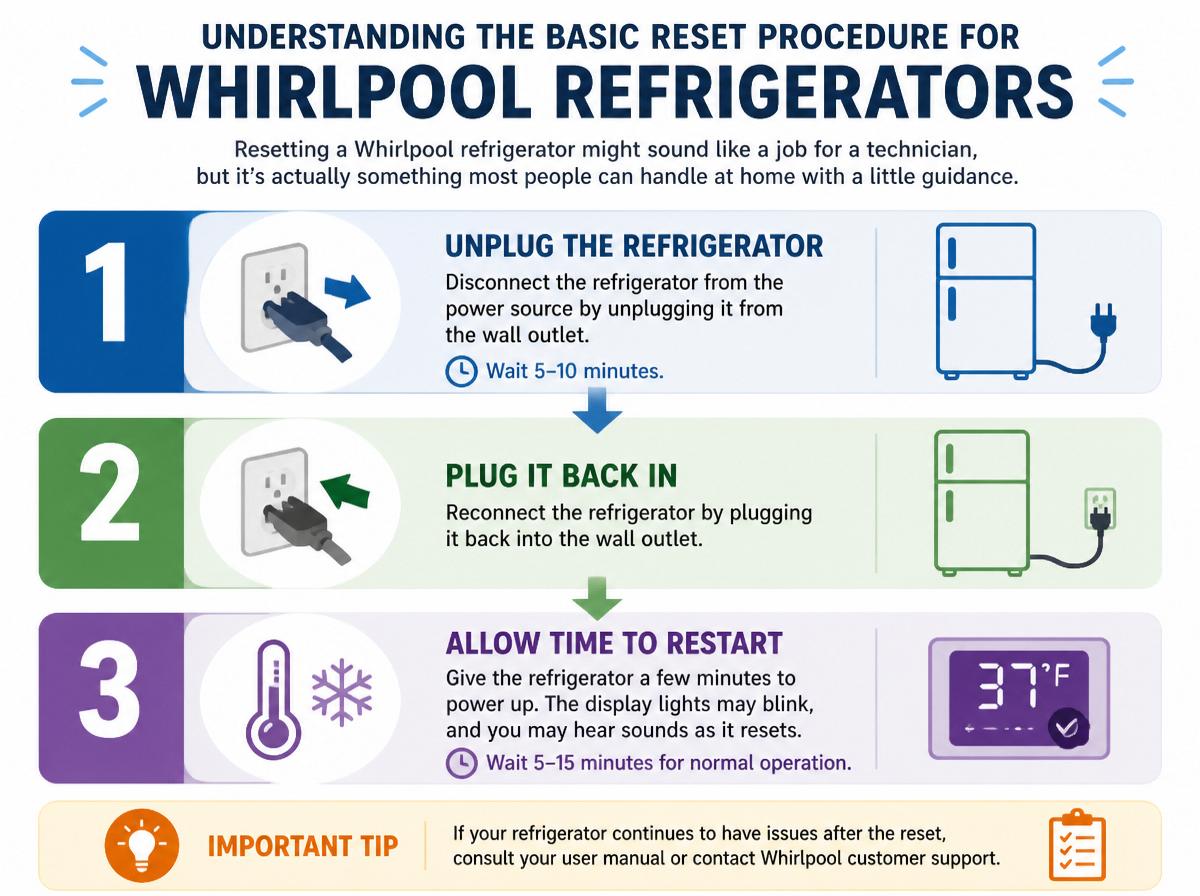
Resetting a Whirlpool refrigerator might sound like a job for a technician, but it’s actually something most people can handle at home with a little patience and care. Before diving in, knowing the component overview helps—a quick glance at the control panel, power source, and interior lights can save some head-scratching moments later. Safety precautions are key: always unplug the refrigerator before interacting with electrical parts to avoid shocks. Even simple tasks become easier with a bit of caution. The basic reset often involves pressing and holding specific buttons on the control panel, gently coaxing the fridge’s system to refresh itself. It might feel a bit like trying to wake a napper, but this process usually clears minor glitches and helps the refrigerator work smoothly again. With a calm mindset, and knowing the basic parts involved, even basics like these become manageable, turning a potentially frustrating chore into a confident, can-do moment.
How to Perform a Power Cycle Reset
Performing a power cycle reset on a Whirlpool refrigerator is a simple yet powerful way to fix many common issues. By unplugging the fridge for a few minutes and then plugging it back in, it gives the appliance a fresh start, much like a quick nap for tired electronics. This easy reset can clear glitches and help the fridge run smoother, making it a handy trick everyone should know.
Steps to Power Cycle
Unplugging the refrigerator might sound simple, but it’s a powerful way to give the appliance a fresh start. Before doing so, confirm cord accessibility—knowing where the plug is makes the reset smooth and quick. Also, use surge protection when reconnecting, protecting your fridge from sudden electrical spikes. Here’s how to power cycle a Whirlpool refrigerator:
- Locate and unplug the power cord from the wall outlet.
- Wait for at least five minutes to let the appliance’s internal systems reset.
- Plug the cord back in, ideally through a surge protector, then check if the refrigerator runs normally.
This small, straightforward process often clears glitches, helping the fridge run like new. It’s a great first step before calling for help—easy and effective!
Benefits of Resetting
Why might a simple unplug-and-plug-back-in trick work wonders for a Whirlpool refrigerator? This easy reset, known as a power cycle, can clear minor glitches hidden inside the fridge’s system. By giving it a quick break, the refrigerator refreshes its internal settings, which often leads to better performance improvement. Not only does this help the fridge run smoother, but it can also contribute to energy savings. When the appliance operates efficiently, it uses less power, which is good for both the environment and your electric bill. Plus, resetting offers a quick fix without needing a costly service call. It’s like giving your fridge a little nap to bounce back stronger—simple, effective, and surprisingly powerful for keeping things cool.
Using the Control Panel to Reset Error Codes
Working through the control panel to reset error codes on a Whirlpool refrigerator may seem tricky at first, but it’s actually a straightforward process that anyone can master with a little patience. The control panel acts like the fridge’s brain, using menu navigation to show error logging details and offering options to clear those alerts. Here’s how to reset error codes using the control panel:
- Press the Menu button until the error code display appears.
- Find the Clear or Reset option using the arrow keys.
- Select this option and confirm, which will erase the error code and restart the error logging system.
Following these steps helps the fridge “forgetits alarms, making it ready to run smoothly again. Remember, staying calm and patient is key—think of it as simply giving your fridge a fresh start, like hitting the refresh button on a stubborn computer. It’s a simple fix that can save time and headache!
Resetting the Ice Maker Function
Resetting the ice maker can fix common problems like it not making ice or making funny noises, giving your fridge a quick boost of fresh functionality. The steps are simple enough to follow, and a reset often saves the day without needing a repair call. Taking a moment to reset might just bring back that satisfying clink of ice cubes falling into the tray.
Ice Maker Reset Steps
Although ice makers usually do their job without trouble, sometimes they need a little nudge to start working again. Resetting the ice maker can help it complete a harvest cycle smoothly and guarantee proper bin alignment for ice collection. Here’s how to get it back on track:
- Locate the reset button—usually on the ice maker itself or inside the freezer.
- Press and hold the button for about 10 seconds until you hear a chime or see the motor activate, signaling the harvest cycle is restarting.
- Check bin alignment to make sure the ice collection bin is seated correctly, allowing ice to dump without jams.
These simple steps often clear minor hiccups, making sure ice keeps flowing like a cool breeze on a summer day!
Common Ice Maker Issues
Ice makers can sometimes throw a tiny tantrum, even after a successful reset. Two common culprits often cause frustration: a clogged fill tube and slow production. When the fill tube gets blocked with ice or mineral buildup, water can’t flow properly, leading to fewer or no ice cubes. Slow production might mean the ice maker is working hard but still can’t keep up, often due to temperature issues or a faulty water inlet valve. These glitches can make mornings tougher, but don’t worry—they’re fixable! Checking the fill tube for blockages and ensuring the freezer’s cold enough can speed things up. Understanding these issues helps users stay patient and proactive, turning ice maker hiccups into small, solvable challenges rather than big headaches.
Benefits of Resetting
Many small problems with the ice maker can disappear almost like magic after a simple reset, making the whole freezer feel brand new again. Resetting the ice maker function offers clear benefits that keep things running smoothly. First, it improves efficiency by clearing glitches that slow down ice production, so ice comes faster. Second, it supports an extended lifespan by helping parts work without strain or breakdowns. Third, it saves money—fewer repairs and less wasted energy mean more cash stays in the wallet. These benefits aren’t just technical; they bring peace of mind, knowing the freezer won’t quit unexpectedly. A quick reset can refresh the ice maker, turning frustration into satisfaction with a simple, guided step. It’s like giving your kitchen helper a fresh start!
When and How to Reset the Temperature Settings
When should someone consider resetting the temperature settings on a Whirlpool refrigerator? Seasonal adjustments are a common reason. As the weather changes from hot summer days to chilly winter nights, the refrigerator may need a little nudge to keep food fresh and safe. Proper temperature helps avoid spoiled meals and guarantees food safety, which is always a win in the kitchen.
To reset the temperature, first locate the control panel, usually inside the fridge or on the door. Press the “Temperatureor “Settingsbutton to cycle through options. Adjust the fridge between 35°F to 38°F and the freezer around 0°F to 5°F for best performance. Hold the button for a few seconds to confirm. Remember, subtle changes can make a big difference—too cold will waste energy, too warm risks spoilage. With patient tweaking, anyone can master this simple task, keeping snacks crisp and family smiles wide. Who knew a quick reset could be so rewarding?
Troubleshooting Common Issues With a Factory Reset
Although performing a factory reset on a Whirlpool refrigerator can often solve stubborn glitches, it sometimes brings unexpected hiccups along for the ride. Users should be aware of potential issues, such as data loss or warranty concerns, to navigate the reset smoothly. Here are three common troubleshooting tips:
- Data Loss A factory reset wipes all custom settings, so make sure to note preferred temperatures or modes before resetting. This prevents frustration and helps restore your fridge just the way you like it.
- Warranty Concerns Some resets might trigger warranty warnings or lock features. Always check your warranty terms to avoid unintentional voiding.
- Persistent Issues If problems persist after resetting, consider professional help. Sometimes, glitches require more than a factory reset.
Taking these steps guarantees the reset restores your fridge’s function without surprises, keeping your cool and confidence intact.
Frequently Asked Questions
Can a Reset Fix Compressor or Motor Issues?
A reset cannot fix compressor or motor issues, as these often involve mechanical faults beyond diagnostic limits. Electrical faults might be temporarily resolved, but persistent problems typically require professional repair or replacement of components.
How Often Should I Reset My Whirlpool Refrigerator?
Like changing leaves signaling time’s shift, resetting a Whirlpool refrigerator aligns with seasonal adjustments. Typically, resets are recommended quarterly or during energy efficiency checks to maintain ideal function and adapt to environmental changes.
Will Resetting Erase All My Stored Settings Permanently?
Resetting a Whirlpool refrigerator typically restores factory defaults, which may erase custom settings. However, settings retention varies by model; some retain user preferences while others require reconfiguration after reset to resume normal operation.
Is It Safe to Reset During Power Outages?
“Better safe than sorry” applies here; resetting during power outages is generally not recommended due to potential electrical hazards and temperature swings that can disrupt appliance function or damage sensitive components, risking further complications.
Can Resetting Impact the Refrigerator’s Warranty?
Resetting a Whirlpool refrigerator typically does not cause warranty voidance if performed according to manufacturer guidelines. However, improper resets may risk coverage loss. Maintaining service documentation is essential to support warranty claims and avoid disputes.
Conclusion
Resetting a Whirlpool refrigerator is like giving a tired artist a fresh canvas—simple steps can erase confusion and repaint smooth operation. Whether powering off or tweaking controls, these resets bring balance back to a noisy hum or a chilly silence. With patience and a smile, even tricky errors bow out gracefully. This friendly guide shows anyone can master their fridge’s quirks, turning frustration into a cool victory, one reset at a time.
Explore This Topic
- Back to Refrigerator
- Back to appliance troubleshooting
Related guides in this cluster: